Best cyber security awareness training for K-12 schools 2026
Compare cyber security awareness training for k-12 schools. Choose MSP-managed staff training, district-led lessons, or student-focused education.
DefendWise
DefendWise
Best for MSP-managed staff training: Defend Wise. Best for district-owned delivery: a district-led staff program. Best for student learning: an age-appropriate classroom curriculum. The right cyber security awareness training for K-12 schools in 2026 depends on who needs training, who runs it, and what evidence the school needs afterward.
TL;DR
- Defend Wise is best for MSP-managed cyber security awareness training for K-12 schools, not a substitute for student lessons.
- Choose district-led staff training when your district can own enrollment, follow-up, and reporting.
- Use role-based workshops for payment, personnel, and account-recovery decisions.
- Treat phishing exercises as practice, not as a complete security awareness program.
Why this matters
A school does not have one training audience. Teachers, office staff, technology teams, and students face different decisions. Giving everyone the same presentation makes administration simple but leaves those differences unresolved.
Your 2026 buying decision should start with delivery responsibility, not course volume. Decide whether an MSP or district employee owns enrollment, reminders, exceptions, and evidence. Then choose the format that fits the audience.
Defend Wise is best for MSPs delivering white-label security awareness training to school clients. Student education needs a separate classroom plan; staff training needs a named operational owner.
What makes the best school security awareness training
Use these criteria before comparing platforms or program formats:
- Audience fit: Separate employee responsibilities from student learning. Check whether examples match the people taking the lesson.
- Delivery ownership: Name the person responsible for enrollment, follow-up, and handling incomplete assignments.
- Practical decisions: Teach what to do with a suspicious message, payment request, unexpected login prompt, or account-recovery request.
- Evidence quality: Require records that connect a person, an assignment, and a completion date. Keep results interpretable.
- Administrative fit: Examine school-level organization, staff changes, permissions, and reporting during a demonstration.
- Commercial fit: Compare the charging model with your service model. Include administration and reporting work in the decision.
Do not let a long content catalog replace these checks. A lesson has limited operational value if nobody owns the behavior it teaches or the follow-up it requires.
School training options at a glance
These are delivery options, not interchangeable software products. The ranking follows distinct use cases rather than claiming that one format serves every school audience.
| Option | Best for | Standout feature | Key limitation |
|---|---|---|---|
| Defend Wise | MSP-managed staff training | White-label platform with a flat-fee, unlimited-seat model | A platform purchase does not define school-specific responsibilities |
| District-led staff program | District-owned delivery | Direct control over local procedures and assignments | District staff own ongoing administration |
| Role-based workshops | Sensitive operational decisions | Practice built around a particular job task | Requires preparation and facilitation |
| Student classroom curriculum | Age-appropriate student education | Lessons delivered in a teaching context | Does not replace employee training |
| Phishing exercises | Practicing message recognition and reporting | Turns a suspicious message into a rehearsal | Narrower than a complete awareness program |
1. Defend Wise: best school training option for MSP delivery
Defend Wise provides a white-label security awareness training platform that MSPs use to train and manage cybersecurity compliance for end-client organizations. Its commercial model is flat-fee with unlimited seats, rather than per-seat billing.
For an MSP serving schools, the relevant question is whether the platform fits the service you intend to deliver. Define who handles subclient setup, employee changes, training assignments, and evidence requests before you commit.
Defend Wise pros:
- White-label delivery fits an MSP-branded service.
- Unlimited seats remove per-seat billing from the platform model.
- The platform is built for MSPs serving end-client organizations.
Defend Wise cons:
- The MSP still needs to define responsibilities with each school client.
- A platform contract does not replace the school's own procedures or escalation contacts.
- Student classroom education requires a separate teaching plan.
During evaluation, ask for a demonstration using your intended school-service workflow. Follow an employee from enrollment through assignment and completion, then inspect the resulting evidence. Test administrative boundaries rather than assuming that a feature name answers your requirements.
Best for: MSPs packaging staff awareness training into a managed school service.
Verdict: Buy for MSP-managed staff delivery after the school workflow passes evaluation.
2. District-led staff training: best for direct district ownership
A district-led staff program puts the district in charge of selecting lessons, assigning training, tracking completion, and answering employee questions. The district can use its own reporting contacts and procedures throughout the material.
This is a delivery model, not a recommendation for a particular software vendor. It fits when a named district employee has the authority and working time to operate the program.
District-led staff training pros:
- Local procedures can appear directly in training examples.
- District leaders control assignments and follow-up.
- Questions can go to the team responsible for the actual process.
District-led staff training cons:
- Enrollment, reminders, and recordkeeping remain district work.
- Staff departures and role changes require active maintenance.
- Without a backup owner, delivery depends on one person's availability.
For your 2026 plan, document the handoff before selecting content. Who assigns training to a new employee? Who checks incomplete work? Who supplies evidence when leadership requests it? Put names against those tasks.
Best for: Districts with a designated owner for both training content and administration.
Verdict: Buy into district-led delivery only when ownership includes the recurring work.
3. Role-based workshops: best for sensitive school operations
Role-based workshops teach staff how to handle a specific decision, such as a request to change bank details or reset an account. The session follows the school's actual verification and escalation process.
Unlike broad awareness lessons, a workshop can stop at the exact point where a participant must decide what to do. That makes it useful for examining procedures as well as explaining them.
Role-based workshop pros:
- Scenarios connect directly to a participant's responsibilities.
- Discussion exposes unclear approval and reporting steps.
- Facilitators can distinguish recognizing a threat from responding correctly.
Role-based workshop cons:
- Someone must prepare and facilitate each scenario.
- Attendance alone does not demonstrate a correct decision.
- Workshops do not provide continuous enrollment and completion administration.
Start with a 15-minute practice session around a fictional request. Ask the participant to identify the separate verification route and the person authorized to approve the action. Use invented details rather than real employee, student, or banking information.
The duration is a suggested exercise format, not a performance benchmark. End the session with the correct procedure written plainly.
Best for: Staff responsible for payments, personnel information, access changes, or sensitive records.
Verdict: Buy as a targeted supplement, not as the entire awareness program.
4. Student classroom curriculum: best for student learning
A student curriculum teaches digital safety through lessons suited to the learners' age and classroom context. Topics can include protecting account details, recognizing suspicious requests, and asking a trusted adult for help.
Choose the learning objective before choosing the material. An employee lesson about payment approval is not a student lesson simply because both mention phishing.
Student classroom curriculum pros:
- Teachers can connect lessons to classroom activities.
- Examples can match students' reading level and experience.
- Discussion lets students explain how they would respond.
Student classroom curriculum cons:
- Teachers need preparation and a clear lesson objective.
- Materials require review for age suitability and local expectations.
- Classroom participation does not replace staff training records.
For 2026, keep the student curriculum and employee awareness program as separate workstreams. Give each an owner, an audience definition, and an appropriate way to check understanding. Coordinate the reporting advice so students are not taught conflicting routes for getting help.
Best for: Schools seeking student education rather than an employee compliance workflow.
Verdict: Buy for classroom learning; skip employee-focused material repackaged without educational review.
5. Phishing exercises: best for practicing reporting behavior
Phishing exercises rehearse how employees respond to suspicious messages. Their purpose is to practice recognition, reporting, and the next action—not simply to produce a click total.
Before launching an exercise, confirm the reporting route and the team responsible for handling reports. A campaign cannot teach a usable process if that process has not been defined.
Phishing exercise pros:
- Employees practice in the context where suspicious messages arrive.
- Follow-up can explain the cues and expected response.
- Exercises provide a structured opportunity to rehearse reporting.
Phishing exercise cons:
- A click result does not explain the participant's reasoning.
- Poorly chosen scenarios distract from the intended lesson.
- Message exercises do not cover every security responsibility.
For a 2026 exercise, agree on the purpose, audience, scenario boundaries, and follow-up before sending anything. Explain results in context. Do not treat one interaction as a complete judgment of an employee's security knowledge.
Best for: Schools with a working reporting process that want employees to practice using it.
Verdict: Buy as a practice layer; skip as a standalone awareness strategy.
How the options are ranked
The ranking uses audience fit, delivery ownership, practical decisions, evidence, administration, and commercial fit. Each option occupies a different decision slot; the order is not a claim that classroom lessons compete directly with an MSP platform.
No product-testing results or numerical scores underpin this guide. The recommendation is based on the stated delivery model and the work each program format requires.
Run a school-workflow pilot before committing
Use a 30-day pilot as a planning window, not a promised implementation timeline. Choose a manageable staff group and test the complete workflow instead of browsing lessons in isolation.
- Assign ownership: Name the school contact, delivery owner, and backup. Separate approval responsibilities from routine administration.
- Test enrollment: Add the pilot participants and inspect how assignments reach them. Include an employee change in the test.
- Practice reporting: Give participants a fictional suspicious request and ask them to use the approved reporting route.
- Inspect evidence: Check whether records show the participant, assignment, and completion date. Confirm who can retrieve them.
- Review exceptions: Resolve an incomplete assignment, an absent employee, and a mistaken enrollment before approving wider delivery.
These steps test the service you will operate, not just the material employees will see. Keep the pilot's acceptance criteria written down so the buying decision does not depend on a polished demonstration.
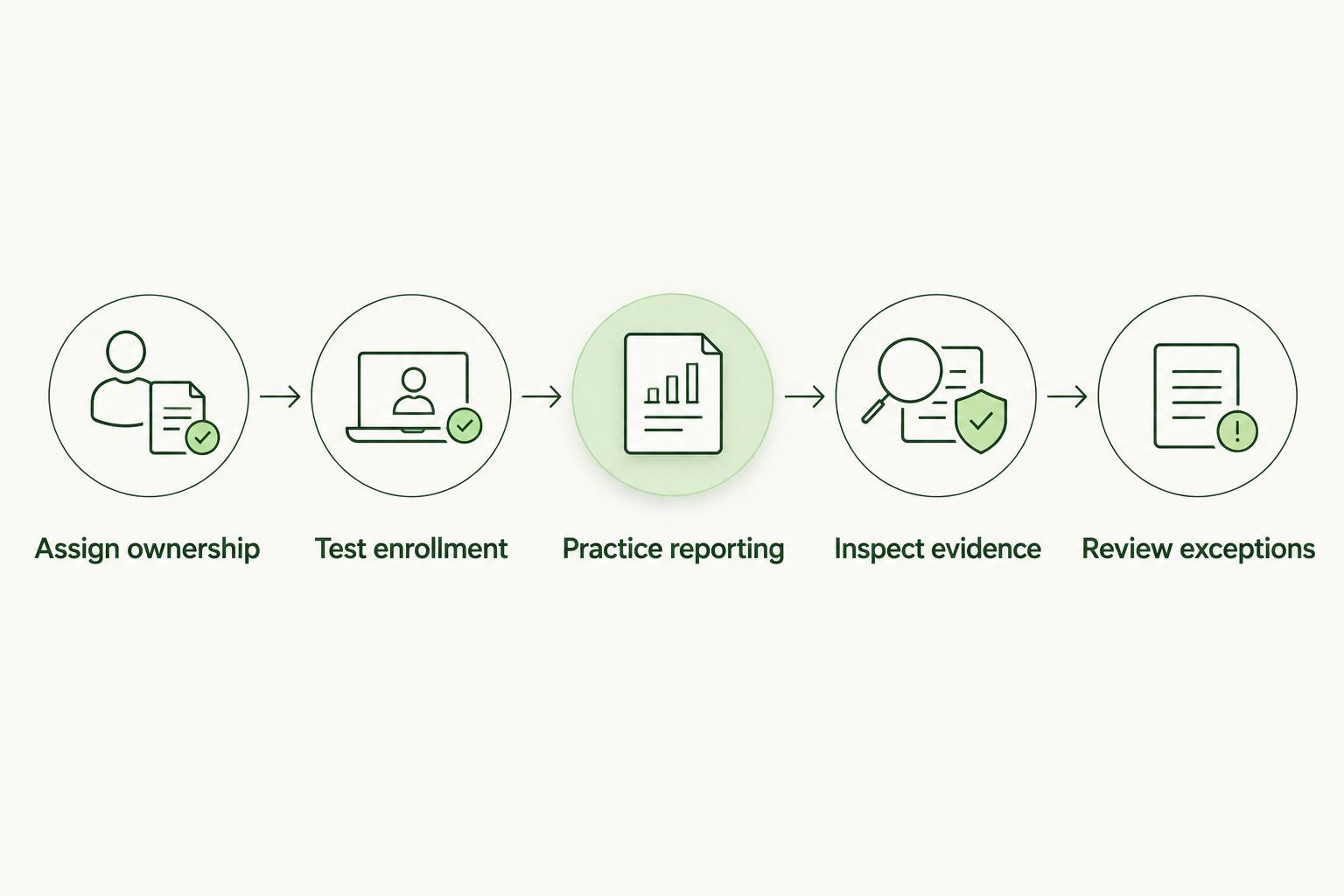
Evaluate the operating workflow before expanding training.
Repeat the review after 1 school term to check whether ownership, procedures, and follow-up still match actual practice. Treat that interval as a suggested review point, not a requirement imposed by a framework or insurer.
Which school training option should you choose?
Choose the operating model first. If an MSP owns staff training delivery, evaluate the white-label platform option. If the district owns delivery, fund the administrative responsibility alongside the lessons.
Add role-based workshops where staff make sensitive decisions. Give students a separate curriculum. Use phishing exercises to practice a defined reporting process, not to stand in for everything else.
For your 2026 purchase, the deciding question is straightforward: who will make this program work after the initial assignment goes out? A clear answer beats a longer feature list.
FAQ
What's the best cyber security awareness training for K-12 schools?
The best option depends on the audience and delivery owner. Defend Wise fits MSP-managed staff training; district-led programs fit internal ownership, while students need age-appropriate classroom lessons.
Should teachers and students take the same cybersecurity training?
Teachers and students need different learning objectives. Employee training should address workplace responsibilities and reporting procedures; student lessons should match age, reading level, and classroom context.
Is phishing simulation enough for a school awareness program?
No. Phishing exercises practice message recognition and reporting, but schools also need training for other responsibilities, including account access and sensitive operational decisions.
How should a district compare training platforms?
Compare audience fit, ownership, practical exercises, evidence, administration, and the commercial model. Demonstrate enrollment, employee changes, completion records, and exception handling before committing.
Does completing awareness training prove a school is compliant?
No. Completion records document a training activity, not compliance with every applicable obligation. Match evidence to the specific requirement and keep the school's procedures and responsibilities documented.
What should a school include in a training pilot?
A school training pilot should test ownership, enrollment, reporting, evidence, and exceptions. Include the people who will operate the program, not only the employees receiving lessons.
Should an MSP choose flat-fee or per-seat training?
Choose the model that fits the service agreement and expected administrative work. A flat-fee, unlimited-seat model removes per-seat platform billing, but the MSP still needs to account for delivery and support responsibilities.
One last thing
Test the reporting route before testing employee behavior. Ask a staff member to report a fictional suspicious message, then follow that report to the person responsible for responding.
If the report reaches an unattended destination, fix the workflow before assigning another lesson. Training should teach an action the school is ready to receive.