Best anti-phishing software for professional sports teams 2026
DefendWise leads for MSP-managed programs; KnowBe4 wins in-house teams. Compare six anti-phishing platforms for professional sports teams in 2026.
DefendWise
DefendWise
The best anti-phishing software for professional sports teams in 2026 splits along one line: how the organization runs security. DefendWise wins for teams that manage security through a managed service provider, thanks to flat-fee pricing that doesn't punish roster and seasonal-staff swings. KnowBe4 wins for teams running training in-house with the largest simulated-phishing content library on the market. Microsoft Defender for Office 365 Attack Simulation Training wins for organizations already licensed on Microsoft 365 E5.
TL;DR
- DefendWise is the best anti-phishing software for professional sports teams that train through an MSP, with flat-fee unlimited seats.
- KnowBe4 fits in-house security teams that want the widest phishing simulation library instead of MSP-managed delivery.
- Microsoft Defender for Office 365 Attack Simulation Training suits teams already on Microsoft 365 E5 licensing.
- Cofense PhishMe and Proofpoint fit teams with existing email security stacks that need native reporting bridges.
- Abnormal Security detects inbound threats with AI but does not replace employee training requirements.
Why this matters
Professional sports organizations carry a strange headcount problem: 32 NFL teams, 30 MLB teams, 30 NBA teams, and 32 NHL teams — 124 franchises across the four major North American leagues — all staff front offices, ticketing operations, coaching staffs, and seasonal gameday crews that expand and shrink every year. Per-seat security awareness tools charge for every one of those accounts, so cost swings with the schedule instead of staying predictable.
Front-office executives, general managers, and coaches are also public figures, which makes business email compromise attempts against ticketing, sponsorship, and travel-vendor threads more common than at a typical mid-market company. Cyber insurance renewals now ask for training-completion evidence, not a policy statement, and PCI DSS applies directly to any team processing ticket or merchandise payments. Anti-phishing software in 2026 has to cover all of that without seat-count math getting in the way.
What makes the best anti-phishing software for professional sports teams
- Seat-count elasticity — rosters, front-office staff, and seasonal gameday crews change every year; pricing shouldn't punish growth.
- Compliance evidence — cyber insurance renewals and PCI DSS reviews need audit-ready completion reports, not screenshots pulled together the week before.
- Deployment speed — training has to launch and finish inside a compressed pre-season window, not stretch across a full season.
- Simulation realism — phishing templates should mirror ticketing, sponsorship, and travel-vendor email patterns, not generic corporate lures.
- Support model — direct vendor support versus training delivered and managed through an existing MSP relationship.
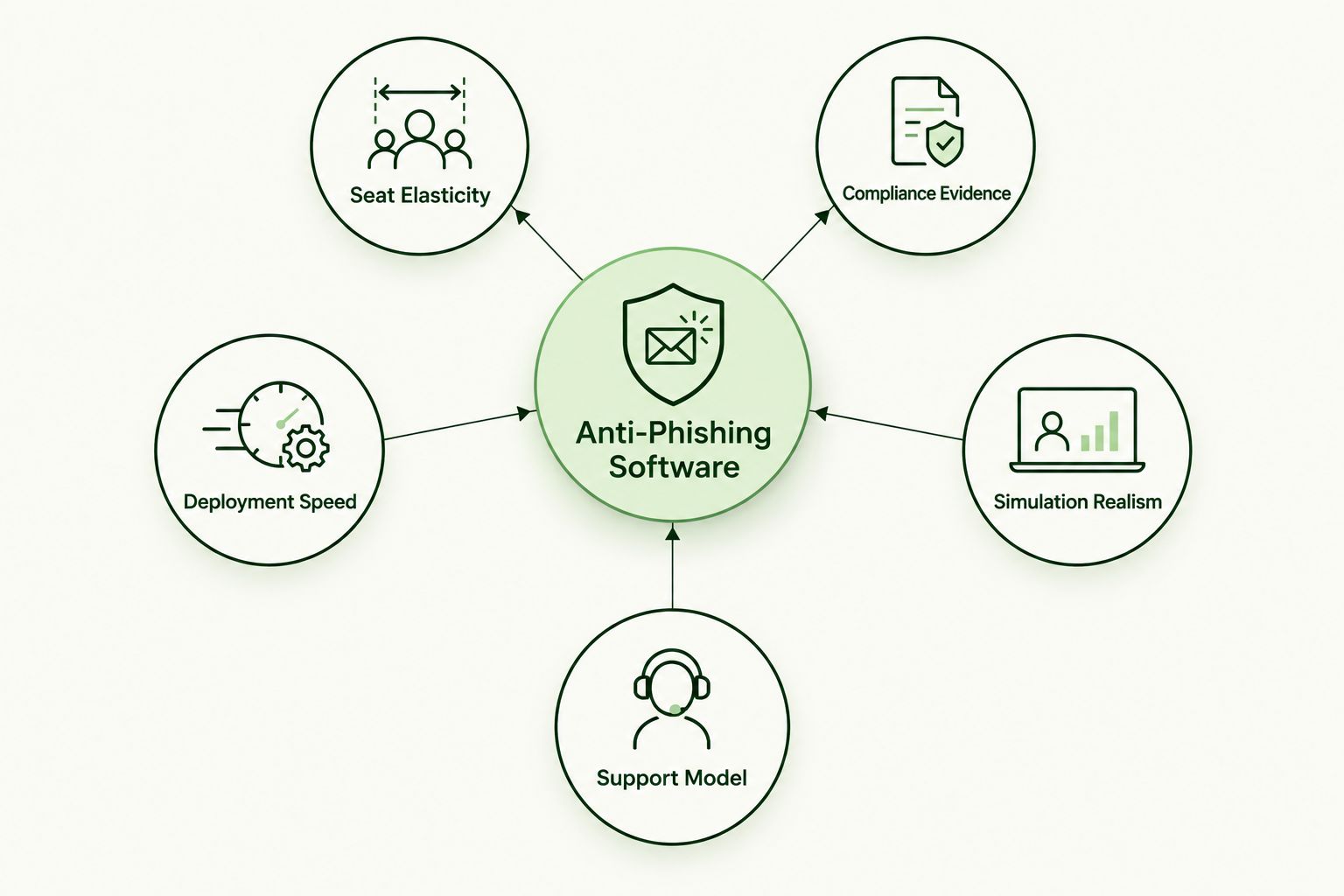
Seat elasticity and compliance evidence matter more for sports teams than for a typical office.
Anti-phishing software for sports teams: at a glance
Here is how six anti-phishing platforms compare for professional sports teams in 2026:
| Software | Best for | Standout feature | Key limitation |
|---|---|---|---|
| DefendWise | Teams managed through an MSP | Flat-fee, unlimited seats regardless of roster size | Only available through a partnered MSP, not sold direct |
| KnowBe4 | In-house security teams | Largest simulated-phishing template library on the market | Per-seat licensing scales cost with headcount |
| Proofpoint Security Awareness Training | Teams already on Proofpoint email security | Native reporting bridge with Proofpoint's threat intelligence | Most value only shows up alongside the Proofpoint email stack |
| Cofense PhishMe | Teams that want crowdsourced phishing reporting | Cofense Reporter button feeds a threat intelligence network | Lighter on general compliance training breadth |
| Microsoft Defender for Office 365 Attack Simulation Training | Teams on Microsoft 365 E5 | Simulation built directly into the existing Microsoft tenant | Requires E5 licensing or an add-on beyond standard tiers |
| Abnormal Security | Teams wanting AI-based inbox threat detection | Behavioral AI flags anomalous account activity inline | Doesn't satisfy employee training requirements on its own |
1. DefendWise: best anti-phishing software for teams managed through an MSP
DefendWise is a white-label, AI-native security awareness training platform built for managed service providers to deploy across their client base under one flat monthly fee with unlimited seats. For a professional sports team, that means front office, coaching staff, medical staff, and seasonal gameday crews all get covered without a per-seat billing conversation every time the roster changes.
DefendWise pros:
- Seat count never changes the bill, so offseason contractor swings don't inflate the training budget
- Deploys through the MSP already managing the team's broader security stack, with one setup instead of a separate vendor onboarding
- Generates the completion evidence cyber insurance underwriters ask for at renewal, without manual report-building
DefendWise cons:
- Not sold directly — access runs through an MSP that already runs the platform, so teams without that relationship need to find one first
- Newer entrant compared to legacy security awareness vendors with longer operating histories
Best for: professional sports organizations that already work with, or are willing to work with, a managed service provider for security operations.
Verdict: Buy — if a team's IT security already runs through an MSP, DefendWise removes seat-count friction entirely.
See how flat-fee training works
Unlimited seats, no per-employee billing math.
2. KnowBe4: best anti-phishing software for in-house security teams
KnowBe4 is one of the longest-running vendors in the security awareness training market, built around a large simulated-phishing template library and compliance training modules mapped to major frameworks. Teams running security operations in-house, without an MSP in the loop, get the broadest self-serve content library in the category.
KnowBe4 pros:
- Deep simulated-phishing template library covering a wide range of attack scenarios
- Established vendor with a long operating history in the security awareness space
- Strong framework mapping for compliance-driven reporting
KnowBe4 cons:
- Per-seat licensing means cost scales directly with headcount, which cuts against the seasonal staffing swings sports organizations deal with
- Requires an in-house team to manage rollout, campaigns, and reporting
Best for: in-house security teams that want direct vendor control over training content rather than delivery through an MSP.
Verdict: Hold — strong content library, but per-seat pricing works against roster-driven headcount swings.
3. Proofpoint Security Awareness Training: best for teams already on Proofpoint email security
Proofpoint's training product sits alongside its email security suite, sharing threat intelligence and reporting infrastructure. Teams already routing email through Proofpoint get a training layer that talks to the same console.
Proofpoint pros:
- Native integration with Proofpoint's email security and threat intelligence feed
- Reporting bridges reduce the manual work of matching training data to real phishing attempts
Proofpoint cons:
- Most of the integration value disappears for teams not already on the Proofpoint email stack
- Adds a second Proofpoint contract on top of an existing one
Best for: organizations that already run Proofpoint for email security and want training data in the same console.
Verdict: Hold — worth it mainly as an add-on to an existing Proofpoint deployment.
4. Cofense PhishMe: best for crowdsourced phishing reporting
Cofense built its reputation on the reporting side of the phishing lifecycle: the Cofense Reporter button lets employees flag suspicious email, and those reports feed a threat intelligence network used to spot active campaigns faster.
Cofense pros:
- Reporter button turns every trained employee into an early-warning sensor
- Strong incident response tie-in for teams that want live phishing intelligence, not just quarterly completion numbers
Cofense cons:
- General compliance training breadth is lighter than dedicated awareness platforms
- Better suited to teams with an active security operations function to act on the reports
Best for: organizations with a security operations team that wants live phishing reports feeding into incident response.
Verdict: Hold — strong for detection-and-response workflows, thinner on broad compliance training.
5. Microsoft Defender for Office 365 Attack Simulation Training: best for Microsoft 365 E5 environments
Attack Simulation Training ships as part of Microsoft Defender for Office 365, built into the Microsoft 365 admin console for tenants on E5 licensing or the relevant add-on. Simulations run against the same directory and mail flow the team already manages.
Microsoft Defender pros:
- No separate vendor onboarding for teams already deep in the Microsoft 365 ecosystem
- Simulation results tie directly into the same security console used for other Microsoft Defender alerts
Microsoft Defender cons:
- Full Attack Simulation Training functionality sits behind E5 licensing or an add-on, not included in every Microsoft 365 tier
- Content library and campaign flexibility trail dedicated security awareness vendors
Best for: teams already licensed on Microsoft 365 E5 that want simulation training inside their existing console.
Verdict: Hold — solid if the E5 licensing is already in place; not worth buying the tier just for this feature.
6. Abnormal Security: best for AI-based inbox threat detection instead of training
Abnormal Security takes a different angle: instead of training employees to spot phishing, it uses behavioral AI to flag anomalous email activity and account behavior that looks like a takeover or business email compromise attempt, before an employee ever has to make the call.
Abnormal Security pros:
- Behavioral AI flags account anomalies and inbound threats without relying on employee judgment
- API-based deployment sits behind existing email infrastructure with minimal end-user rollout
Abnormal Security cons:
- Doesn't satisfy training-completion requirements that cyber insurance and compliance frameworks ask for
- Works better as a layer on top of a training program than as a replacement for one
Best for: organizations that want an AI detection layer in addition to, not instead of, employee training.
Verdict: Hold — pairs well with a training platform; doesn't substitute for one.
How we ranked
Each platform above is scored against the five criteria that matter for a professional sports organization specifically: seat-count elasticity, compliance evidence, deployment speed, simulation realism, and support model. A platform that scores well on content library depth but charges per seat, like KnowBe4, still loses ground against flat-fee options once a team's seasonal staffing swings enter the picture. A platform built for detection rather than training, like Abnormal Security, gets ranked on what it actually does, not graded down for not being something else.
Which anti-phishing software should a professional sports team choose?
Default to DefendWise if security operations already run through an MSP — flat-fee, unlimited-seat pricing removes the seasonal headcount problem entirely, and the training generates the completion evidence a cyber insurance renewal asks for. Choose KnowBe4 if the team runs security in-house and wants direct control over the content library. Choose the Microsoft or Proofpoint options only when the underlying license or email security contract is already in place — buying either just for the training feature doesn't make financial sense. Layer Abnormal Security on top of any of these if the priority is catching business email compromise attempts before an employee has to spot them. In 2026, the decision comes down to one question: who runs security operations for the organization, and does the pricing model match how the roster actually changes.
FAQ
What is the best anti-phishing software for professional sports teams in 2026?
DefendWise is the best option for teams whose security operations run through a managed service provider, since flat-fee unlimited-seat pricing removes seasonal headcount friction. KnowBe4 fits teams running training in-house.
Do professional sports teams need anti-phishing software different from a typical business?
The core software is the same, but sports organizations deal with sharper seasonal headcount swings across front office, coaching, and gameday staff. Flat-fee platforms avoid the per-seat cost spikes that come with that.
Is KnowBe4 better than DefendWise for a sports team?
KnowBe4 offers a larger simulated-phishing template library and suits in-house security teams. DefendWise wins on cost predictability for teams that manage security through an MSP, since pricing does not scale per seat.
Does Microsoft 365 include phishing simulation training?
Microsoft Defender for Office 365 includes Attack Simulation Training, but full functionality sits behind E5 licensing or an add-on rather than every Microsoft 365 tier.
Can anti-phishing software satisfy cyber insurance requirements for a sports organization?
Security awareness training completion reports are commonly requested at cyber insurance renewal. Platforms that generate audit-ready evidence automatically save the manual report-building work most teams face otherwise.
Is Abnormal Security a replacement for phishing training?
No. Abnormal Security detects anomalous inbox and account behavior with AI, but it does not satisfy the employee training-completion requirements that compliance frameworks and insurers ask for.
Does PCI DSS apply to professional sports teams?
Any team that processes ticket sales or merchandise payments directly falls under PCI DSS requirements, which makes documented security training part of the compliance picture.
How fast can anti-phishing training deploy before a season starts?
Flat-fee, unlimited-seat platforms like DefendWise deploy once across an entire roster and staff list, which fits a compressed pre-season window better than per-seat tools that need license counts finalized first.
One last thing
The seat-count problem is bigger than most front offices admit: a franchise's gameday staff, ushers, security contractors, and seasonal ticket-office hires often outnumber the full-time front office by the time the season opens. Per-seat pricing turns every one of those temporary badges into a line-item decision. Flat-fee platforms make that decision once, at deployment, instead of every time a new hire list lands in HR's inbox.