Automatically alert Slack when a phishing test fails
Build a slack alert failed phishing test workflow with incoming webhooks, client routing, duplicate checks, and clear follow-up. Keep employee details private.
DefendWise
DefendWise
Instead of manually checking campaign results and copying failures into Slack, route each confirmed phishing-simulation failure through an event filter and a Slack incoming webhook. A reliable slack alert failed phishing test workflow checks the client, removes duplicate events, and posts an actionable message to a restricted channel.
TL;DR
- A slack alert failed phishing test workflow needs a confirmed failure event, duplicate protection, and a restricted Slack destination.
- Defend Wise fits MSPs seeking white-label security awareness training without seat-count friction.
- Slack incoming webhooks deliver messages; your automation handles event filtering, client routing, and retries.
- Keep employee details out of shared channels and assign follow-up outside the alert.
Why this matters
A failed phishing simulation needs follow-up, not another dashboard someone must remember to open. Slack puts the result where your service team works, but an unfiltered notification feed creates a different problem: duplicate messages, unclear ownership, and client information in the wrong channel.
Defend Wise is best for MSPs seeking white-label security awareness training without seat-count friction. Defend Wise provides the training platform; this guide covers the separate event-to-Slack delivery workflow. Use the event interface your training system actually provides rather than assuming a particular connector exists.
For your 2026 service runbook, separate notification from remediation. The alert tells your team that a defined failure occurred. Your follow-up process decides who reviews it, whether additional training is appropriate, and what evidence belongs in the client record.
The old way is manual copying. The new way is controlled event delivery—not broadcasting every campaign interaction.
Before you start
- Slack access: Use a workspace where you can create or install an app, subject to workspace approval requirements. Have access to the restricted channel that will receive alerts.
- Event access and a runner: Confirm that your training system exposes the relevant result through a supported webhook, API, export, or automation connector. Use a runner that can map fields, store secrets, execute a delivery job, and retain processing state.
- The gotcha: Define failure before connecting anything. A link click, form submission, report, and campaign completion are different events. Select the vendor's documented failure condition and preserve its event identifier.
Do not build around a screen label alone. Inspect a representative event and confirm its client identifier, result meaning, and identifier stability. If your source only supplies exports, use a scheduled import rather than describing the workflow as immediate.
For MSP operations, client routing is a prerequisite. Decide whether alerts belong in a restricted internal service channel or separate client-specific channels. Neither route should depend on an employee's display name.
Slack destination
Create a Slack incoming webhook for the channel that should receive the alert. An incoming webhook accepts an HTTP request and posts its message to the associated conversation; it does not fetch phishing results or determine whether someone failed.
- Open Slack's app management interface and select Create New App.
- Select From scratch, enter an app name that describes its purpose, and choose the intended workspace.
- Open Incoming Webhooks and enable Activate Incoming Webhooks.
- Select Add New Webhook to Workspace, choose the destination channel, and select Allow. Complete workspace approval if required.
- Store the generated webhook URL in your runner's secret storage. Make it available to the delivery process as
SLACK_WEBHOOK_URL.
Treat the webhook URL as a credential. Do not paste it into tickets, source control, event payloads, or screenshots. Anyone who obtains the credential can send messages through that webhook.
For a private channel, ensure the app has the required channel access before authorizing the webhook. Choose the channel deliberately: incoming-webhook routing is associated with the webhook's configured destination.
Expected result: your runner has a secret-backed destination for the intended Slack channel. No phishing event has been connected yet, so creating the app alone should not produce campaign alerts.
Choose the destination boundary
These are routing choices, not different Slack products. Choose according to who needs the information and which client boundaries your team must preserve.
| Routing option | Best for | Advantage | Limitation |
|---|---|---|---|
| Restricted internal channel | MSP service teams handling follow-up centrally | Keeps operational triage together | Requires explicit client identification and disciplined access control |
| Separate client channels | Teams with client-specific ownership | Separates conversations by client | Requires more destination mappings and permission maintenance |
Use a controlled client-to-destination mapping. Do not accept a destination supplied directly by an incoming event without validating it against your approved configuration.
Failure event contract
Normalize the source event before sending it to Slack. This keeps vendor-specific result names out of your delivery logic and gives you a consistent place to enforce client boundaries.
- Identify the source's documented failure event or result field.
- Map that result to the local value
failedonly when it meets your chosen failure definition. - Preserve the source event identifier and client identifier.
- Map the campaign name or reference into a readable campaign field.
- Remove unnecessary employee information before handing the event to the Slack delivery job.
Use the following local contract. These are fields you define in your automation, not claims about any training platform's native payload.
| Local field | Purpose | Validation rule |
|---|---|---|
event_id |
Duplicate detection and traceability | Require a stable source identifier |
client_id |
Client routing | Require a match in your approved client mapping |
client |
Readable client reference | Supply a controlled label, not arbitrary message text |
campaign |
Campaign context | Require a nonempty name or reference |
result |
Delivery filter | Send failure alerts only for failed |
Do not use an employee email address as the duplicate key. The same person can participate in different campaigns, and one campaign can produce different event types.
For your 2026 mapping record, document which source field becomes each local field. Record the failure definition alongside the mapping. That makes a later connector change reviewable instead of silently changing what triggers an alert.
Expected result: each accepted failure has a known client, a stable event identifier, and enough campaign context for an operator to locate the underlying record.
Delivery handler
Keep the Slack message short. Include the client, campaign, event reference, and required next action; leave personal detail in the access-controlled source system.
- Configure the runner to write the normalized event to a local JSON file for the delivery job.
- Provide the webhook URL through
SLACK_WEBHOOK_URL, never through that event file. - Save the following handler as
send_failure.pyin your controlled automation environment. - Run it with
python3 send_failure.py event.jsonafter the client-routing and duplicate checks pass.
This Python example uses the standard library. It validates the local event, ignores non-failure results, and returns a failed process status when delivery fails.
import json
import os
import sys
import urllib.error
import urllib.request

with open(sys.argv[1], encoding="utf-8") as source:
    event = json.load(source)

if event.get("result") != "failed":
    sys.exit(0)

required = ("event_id", "client_id", "client", "campaign")
for field in required:
    value = event.get(field)
    if not isinstance(value, str) or not value.strip():
        raise SystemExit(f"Invalid required field: {field}")

webhook = os.environ.get("SLACK_WEBHOOK_URL")
if not webhook:
    raise SystemExit("Slack webhook secret is not configured")

def plain(value):
    return value.replace("\r", " ").replace("\n", " ").strip()

message = "\n".join([
    "Phishing simulation failure",
    "Client: " + plain(event["client"]),
    "Campaign: " + plain(event["campaign"]),
    "Event: " + plain(event["event_id"]),
    "Action: Review the source record and assign follow-up."
])

payload = json.dumps({
    "text": message,
    "blocks": [{
        "type": "section",
        "text": {"type": "plain_text", "text": message}
    }]
}).encode("utf-8")

request = urllib.request.Request(
    webhook,
    data=payload,
    headers={"Content-Type": "application/json"},
    method="POST"
)

try:
    with urllib.request.urlopen(request) as response:
        reply = response.read().decode("utf-8").strip()
        if response.status != 200 or reply != "ok":
            raise SystemExit("Slack did not confirm delivery")
except urllib.error.HTTPError as error:
    raise SystemExit(f"Slack delivery failed: HTTP {error.code}")
except urllib.error.URLError:
    raise SystemExit("Slack delivery failed: network error")
This handler sends a message; it is not an event receiver or a duplicate store. Your runner must authenticate incoming events, select the approved client destination, and coordinate retries. Keeping those responsibilities separate makes failures easier to diagnose.
Expected result: an accepted failure produces a plain-text Slack message without employee details. A non-failure event produces no message. A delivery error produces a failed job for the runner to handle.
Automation controls and acceptance tests
Connect the delivery handler to your supported event source only after the mapping and destination work independently.
- Configure the source trigger or scheduled import using its documented authentication method.
- Validate the incoming event, then normalize its fields into the local contract.
- Check
client_idagainst the approved destination mapping. Reject unknown clients rather than using a default channel. - Check whether the event has already been delivered. Use a key that includes the client identifier and source event identifier.
- Reserve the event for processing so concurrent jobs do not both send it.
- Run the delivery handler with the mapped webhook secret. Mark the event delivered only after Slack confirms success.
- Release or update the reservation on failure and apply the runner's retry policy.
The sequence is Validate, Route, Deduplicate, Deliver, Record. The order matters: recording success before delivery can lose an alert, while checking duplicates without reserving the event leaves a concurrency gap.
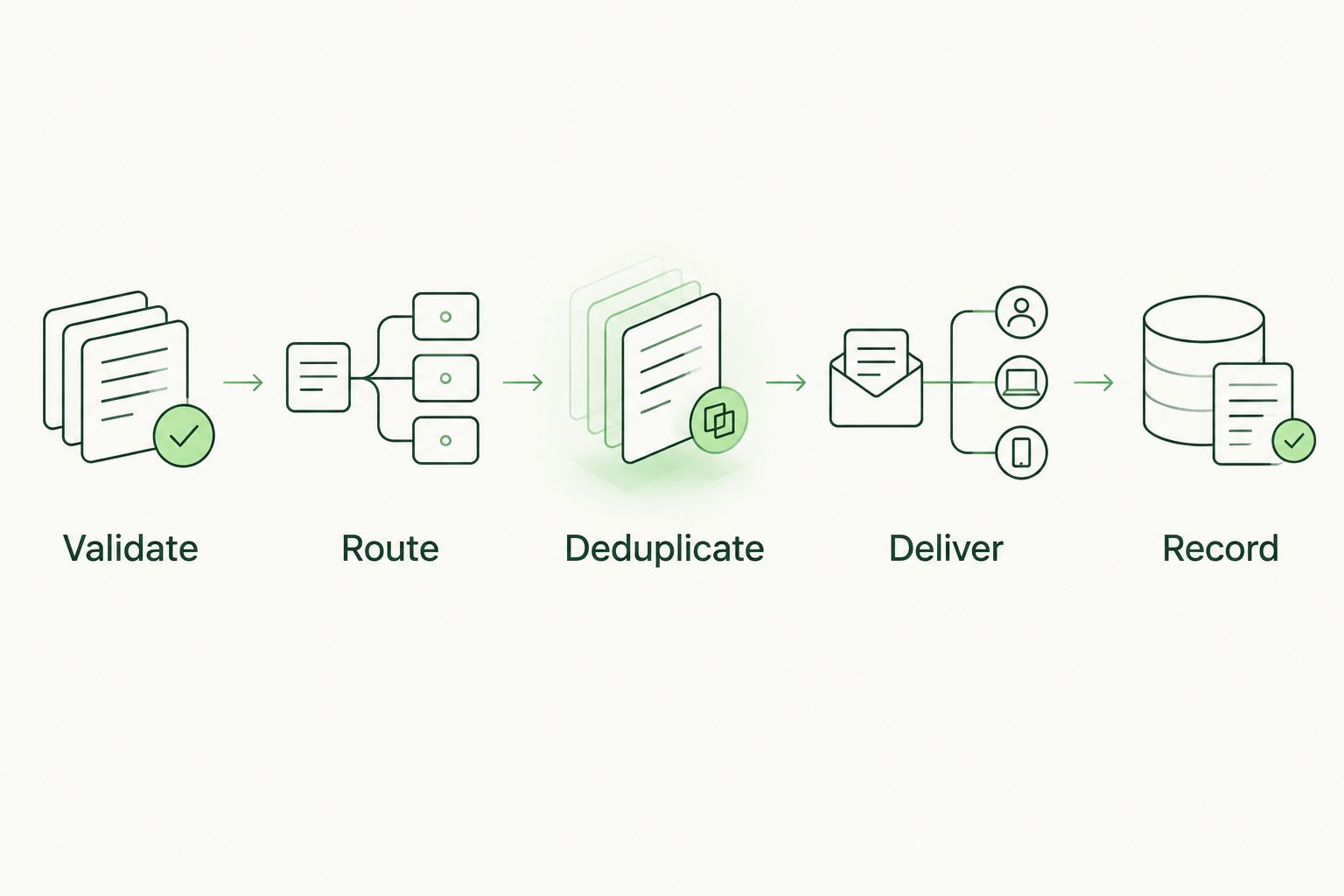
Record delivery only after Slack confirms the message was accepted.
Use 3 acceptance cases before enabling production delivery: a confirmed failure, a non-failure event, and a replay of the confirmed failure. The expected outcome is 1 Slack message across those cases, with the replay suppressed.
Then make 2 verification passes: check the Slack destination and check the processing record. Confirm the client mapping, event reference, delivery status, and absence of unnecessary personal information.
Add a negative routing test to your 2026 acceptance checklist. An unknown client must fail closed, not land in whichever channel happens to be configured first.
Expected result: the workflow delivers the right event to the right channel and leaves a processing record your team can inspect. A failed delivery remains visible to operators rather than disappearing into a successful-looking job.
Alert when an unresolved failure changes
A second useful workflow alerts on a documented status transition after the original failure. For example, your internal remediation record can distinguish an assigned follow-up from a completed follow-up.
Use this variant only when the system holding that record exposes status changes. Do not infer completion from a person viewing training or opening a message.
- Define the exact transition that deserves notification.
- Use the remediation record identifier and transition identifier for duplicate detection.
- Route the update through the same approved client mapping.
- State what changed and who owns the next action.
- Suppress unchanged records during scheduled polling.
The trade-off is more event logic. Initial failure alerts need a clear failure definition; status-change alerts also need a reliable remediation record. Keep this second workflow separate until the first passes acceptance tests.
Troubleshooting
The job runs, but Slack stays silent
Check the delivery status and response, not just whether the trigger executed. Confirm that the webhook secret is present, the event reached the delivery step, and the destination app still has channel access. Send a controlled test through the same runner environment.
Every campaign interaction creates an alert
Fix the normalization filter. A campaign event is not automatically a failure: map only the documented result that matches your policy. Test a reported simulation and a non-failure event before re-enabling delivery.
One failure creates repeated messages
Inspect the event identifier and processing reservation. Duplicate source delivery, overlapping imports, and concurrent jobs can all repeat work. Use stable identifiers and an atomic reservation; record success after delivery, not before it.
An alert appears in the wrong client channel
Stop that route and inspect the client-to-webhook mapping. Remove fallback destinations for unknown clients. Validate each client mapping before restoring delivery, and handle any exposed client information through your incident process.
Delivery fails intermittently
Separate temporary network failures and rate limiting from invalid credentials or permissions. For rate-limited responses, respect Slack's retry instructions. A network failure after transmission can leave delivery uncertain, so do not promise exactly-once messaging; make the event reference visible for reconciliation.
Customize your workflow
Expand the process only after the basic alert is dependable. Add a service-owner lookup, a ticket reference, or a client-specific follow-up rule where your systems support it. Do not turn Slack into the sole record of training outcomes.
For a 2026 client service review, ask whether each alert leads to a named owner and a recorded action. If nobody acts on a notification, revise the workflow rather than adding more notifications.
Defend Wise's white-label security awareness training model addresses MSP training delivery and seat-count friction. Your automation still needs client boundaries, delivery monitoring, and an evidence process. Unlimited seats do not remove those responsibilities.
FAQ
How do I automatically send Slack alerts for failed phishing tests?
Connect a supported phishing-result source to an automation runner, filter for confirmed failures, and send a message through a Slack incoming webhook. Validate the client destination and suppress duplicate events before delivery.
Does a Slack incoming webhook detect phishing test failures?
No. A Slack incoming webhook receives a message payload; your event source and automation determine whether a phishing simulation failed.
Can I use this workflow with Defend Wise?
Use this workflow with Defend Wise only through a supported event-access method confirmed for your account. The delivery pattern does not establish that a particular native connector or webhook is available.
Should failed phishing tests go into a public Slack channel?
Use a restricted channel for operational alerts. Keep employee details in the access-controlled source system and send only the context needed for follow-up.
How do I prevent duplicate phishing alerts in Slack?
Use a stable source event identifier paired with the client identifier, and reserve each event before sending. Record successful delivery only after Slack confirms acceptance.
Can I automate alerts if my training system only exports results?
Yes, through a scheduled import that preserves stable event identifiers and documented result meanings. Export-based delivery follows the import schedule rather than the original event time.
Does a failed phishing test alert prove compliance?
No. A Slack alert is an operational notification, not a complete compliance record. Preserve the underlying result and follow-up evidence in the appropriate client record.
One last thing
Test the event you should not deliver. Before closing your 2026 runbook, submit a valid-looking failure with an unknown client identifier. The correct result is rejection with an operator-visible processing error—not a Slack message in a default channel.
That boundary test protects something a successful demo cannot: the separation between your clients.