MSP security training platform architecture: what to test before rollout
A practical guide to testing tenant boundaries, identity lifecycle, reporting, branding, and offboarding in an MSP security training platform.
DefendWise
DefendWise
TL;DR
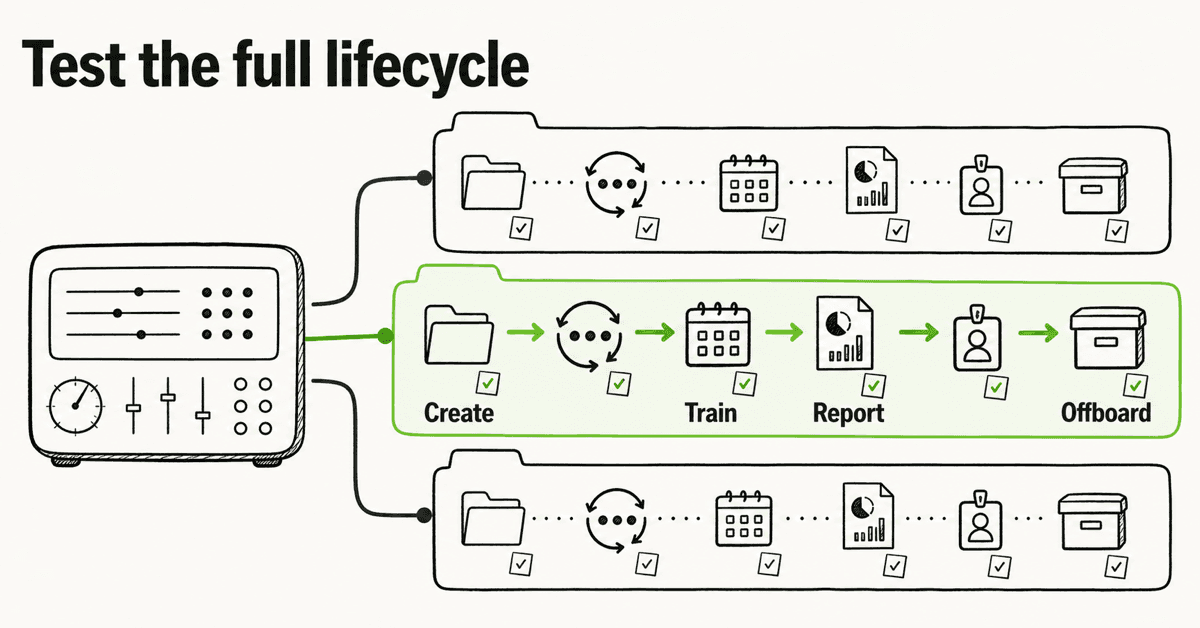
An MSP security training platform should be tested as a client-service system, not judged as a course catalog. Trace one client from tenant creation through identity changes, campaign delivery, reporting, delegated access, and offboarding. The platform earns its place when the MSP can control the fleet without blurring client boundaries or creating a manual process for every exception.
The architecture matters after the demo ends
A polished learner module is easy to show. The harder questions arrive once an MSP puts 20, 50, or 100 client organizations behind the same service desk.
Who can see each client? What happens when an employee changes roles? Can the MSP change a campaign across the fleet without overwriting a client exception? Does the report explain its audience and reporting period? Can the MSP remove a client cleanly without losing the evidence that must be retained?
Those are architecture questions. They decide whether the platform becomes a repeatable managed service or another tool held together by tickets and spreadsheets.
NIST SP 800-50 Rev. 1 describes cybersecurity and privacy learning as a lifecycle. It covers needs, roles, delivery, metrics, evaluation, and regular improvement. An MSP platform does not need to copy a federal program. It does need to support the same basic reality: learning is an operating process, not a one-time upload.
CIS Control 14 calls for an awareness and skills program that is established and maintained. That makes the platform's operating controls at least as important as the size of its library.
Start with the MSP control plane
The MSP control plane is the layer from which your team manages every client. It should make fleet work faster while preserving client-level separation.
A single dashboard is useful only if its permissions, filters, exports, and changes respect tenant boundaries. OWASP's multi-tenant security guidance warns that shared applications create cross-tenant risks when tenant context, authorization, storage, cache keys, logging, or object access are handled badly.
You do not need a vendor to disclose every database choice during a first call. You do need evidence that isolation is designed and tested.
Ask the vendor to demonstrate:
- an MSP administrator viewing the whole fleet;
- a technician limited to assigned clients;
- a client administrator who can see only their organization;
- a report export for one client;
- a search for a user whose email pattern exists in 2 clients;
- a campaign change applied globally, then overridden for 1 client;
- an audit record showing who changed what and where.
The important test is negative: try to cross a boundary. Change the client identifier in a URL if the product exposes one. Search for another client's learner. Open an old export link from a different role. Ask what appears in logs when access is denied.
A vendor may not allow ad hoc penetration testing in a sales trial. That is reasonable. The vendor should still be able to explain its role model, tenant-isolation tests, security review process, and response to a suspected cross-tenant event.
Map the client lifecycle before choosing the connector
Directory sync is not a checkbox. It is a chain of decisions about scope, identity matching, changes, failures, and removal.
Microsoft explains that application provisioning in Microsoft Entra ID covers creation, maintenance, and removal as user status or roles change. It also notes that scope rules, attribute mappings, group behavior, and target-system actions affect what actually happens.
SCIM is one common standard for this exchange. Microsoft's SCIM architecture guide describes automated provisioning and deprovisioning between identity systems and target applications. RFC 7644 defines operations for creating, reading, modifying, and deleting resources, with security and multi-tenancy considerations.
The standard helps. It does not remove the need to test the implementation.
Test the joiner path
Start with a user who should be in scope and another who should not. Record the source group or rule, matching attributes, selected client, time until enrollment, assignment, learner experience, and evidence.
Then add a user with a duplicate display name, an alias, or an email change. The platform should avoid creating a silent duplicate or placing the learner in the wrong client.
Test the mover path
Role changes often expose weak lifecycle design. Move a user from one department or group to another. Check whether learning assignments, reporting scope, and history behave as expected.
The right behavior depends on the service policy. A role change may trigger new learning while preserving completed evidence. What matters is that the behavior is documented and visible.
Test the leaver path
Remove or disable the user at the identity source. Check whether access is disabled, reminders stop, the person leaves active audience counts, required history remains available, an audit record appears, and a failed removal becomes a visible exception.
Do not accept "we sync with Microsoft 365" as the result. The result is a tested joiner-mover-leaver workflow with named exception handling.
Separate fleet defaults from client exceptions
MSPs need standardization to protect margin and quality. Clients still have real differences in workforce, language, risk, policy, and contractual obligations.
The platform should support a default MSP service pattern, then allow controlled client exceptions without turning every client into a separate project.
| Architecture layer | Fleet default to define | Client exception to control | Evidence to retain |
|---|---|---|---|
| Tenant | Naming, owner fields, default roles | Extra client admin or restricted technician | Tenant and access record |
| Identity | Source, scope, matching, reconciliation | Special group, contractor source, manual exception | Sync log and exception owner |
| Learning | Baseline, cadence, reminder rules | Role-specific or client-required content | Assignment and change record |
| Reporting | Period, audience, fields, delivery route | Extra recipient or approved format | Delivered report and recipient list |
| Branding | MSP logo, colors, sender, domain | Client sub-brand where contracted | Approved brand settings |
| Retention | Standard history and export process | Contractual or legal requirement | Policy, approval, and export record |
| Offboarding | Disable, export, remove access, close tenant | Extended evidence handover | Offboarding checklist |
The architecture should make a deviation visible. If a client needs a different reminder cadence, record who approved it and whether it adds recurring work. If a technician receives broader access for a project, time-bound it and review it.
Design reporting from the decision backward
A report is useful when it supports a client decision. A chart without a clear audience, reporting period, denominator, and action can create more questions than it answers.
NIST CSF 2.0 helps organizations understand and improve how they manage cybersecurity risk. It is not a reporting template for security awareness. Its governance and improvement orientation supports a practical rule: reports should help owners decide what happens next.
A client report should state:
- Which client and reporting period it covers.
- Which people were expected to participate.
- Which identities or deliveries failed and why.
- Which learning or exercises were assigned.
- Which work was completed or overdue.
- Which reporting route employees were taught to use.
- Which exceptions and actions remain open.
- Who owns each action and by when.
CISA advises businesses to teach employees to recognize and report phishing, reinforce the message between formal training, and make the reporting route clear. The platform report should connect learning to the action the client expects, not stop at a completion percentage.
Keep the claim boundary clear. A completion record proves that the platform recorded a completion under the stated conditions. It does not prove compliance, behavior in every context, or prevention of a future incident.
Test delegated administration as a security feature
Client administrators can reduce MSP workload, but delegation changes the threat model. The MSP should decide what a client admin can view, edit, export, and send.
Test whether a client admin can add or remove users, assign learning, change due dates, view individual results, export personal data, edit branding, invite another administrator, delete evidence, or change a reporting recipient.
Then decide which permissions belong in your service. Least privilege is more useful than a single client-admin role that grants everything.
Also test technician delegation. A help-desk technician may need to resolve access problems without seeing every learner result or changing fleet policy. A service manager may need reporting access across clients without permission to alter identity settings.
The platform's role names matter less than whether those work patterns can be represented safely.
Treat white-label as an end-to-end path
White-label delivery is not a logo field. It is the full client-facing path.
Check the portal, login and reset pages, sender and reply route, enrollment and reminder emails, reports, certificates, help links, privacy and terms links, client overrides, and the experience shown when something fails.
A half-branded path creates support confusion. A learner may trust the MSP-branded invitation, then land on an unfamiliar vendor domain and report it as phishing. That is not automatically a product failure. It is a service-design problem the MSP should see before rollout.
Connect training to the wider client program
A security training platform is one part of a security program. It should reinforce actions that technical and response controls can support.
CISA's small-business cyber guidance divides responsibilities among leadership, a security program manager, and IT. It places formal training alongside incident planning, MFA, backups, and other safeguards. The MSP can coordinate technology and service delivery. Client leadership still owns culture and business decisions.
The platform should make the reporting path easy to teach and review. It should not claim to replace email security, identity controls, incident response, legal advice, or executive ownership.
Periodic exercises can expose gaps between training and real response. CISA Tabletop Exercise Packages provide customizable scenarios, objectives, discussion questions, and after-action material. A tabletop is different from a learner module, but both can reveal whether people know their roles and escalation routes.
Include offboarding in the buying decision
Offboarding rarely appears in a product tour. It should appear in the architecture review.
Before signing, ask what happens when a client leaves, the MSP changes vendors, the client requests its evidence, an administrator must be removed, a custom domain is retired, a directory connection is revoked, retention periods expire, or a legal hold applies.
Run a trial offboarding with test data. Export the agreed records. Remove client access. Disable integrations. Confirm what remains visible to the MSP and for how long. Record any manual vendor request.
Exit cost is part of platform cost. A low subscription price can still create expensive work if evidence, identity connections, and client access cannot be unwound cleanly.
A 12-test architecture scorecard
Use the same tests for every shortlisted platform.
| Test | Pass condition | Evidence |
|---|---|---|
| 1. Tenant creation | Client is created from a controlled default | Setup record |
| 2. Role isolation | MSP, technician, and client admin see only approved scope | Test notes |
| 3. Cross-tenant negative test | Another client's object cannot be viewed or exported | Vendor evidence or approved test result |
| 4. Joiner | In-scope user enrolls correctly | Sync and assignment record |
| 5. Mover | Role or group change produces documented behavior | Before-and-after record |
| 6. Leaver | Access and reminders stop while required history is handled correctly | Removal and history check |
| 7. Fleet campaign | Default applies across selected clients | Campaign record |
| 8. Client exception | One approved override survives the fleet change | Exception record |
| 9. Reporting | Report states audience, period, exceptions, and actions | Generated report |
| 10. White-label path | Portal, messages, reports, and support route match the service | Learner-path review |
| 11. Failure recovery | A bad identity or delivery failure becomes a visible exception | Error and reconciliation record |
| 12. Offboarding | Export, access removal, integration shutdown, and closure are controlled | Offboarding checklist |
Score the evidence, not the salesperson's answer. Use 0 for not demonstrated, 1 for partly demonstrated or manual, and 2 for demonstrated under your test conditions. Add notes for recurring manual work.
A platform that scores well but requires a human to repair every lifecycle event may still be the wrong fit. The scorecard should show functional coverage and operational load.
Where DefendWise fits
DefendWise is built for MSPs. Its current public offer includes multi-tenant management, white-label delivery, automated onboarding, automated reporting, Microsoft 365 sync, and flat $399/month pricing for unlimited users and client organizations.
Those capabilities do not remove the MSP's responsibility to define access, scope the identity source, review exceptions, agree the client report, and test offboarding.
Use the free 7-day trial to run the 12 tests with one representative client workflow. Bring the service owner, one technician, and a client administrator. The output should be an evidence-backed operating decision, not a list of features everyone liked in the demo.
Frequently asked questions
What is an MSP security training platform?
It is a platform an MSP uses to run workforce security learning across multiple client organizations. The architecture should cover tenant boundaries, identity lifecycle, campaign operations, delegated access, reporting, branding, and offboarding.
Why does multi-tenant architecture matter?
The MSP needs fleet-level control without exposing one client's users, reports, settings, or history to another. Test permissions and negative access paths across searches, links, exports, reports, and delegated roles.
Which identity features should be tested?
Test source scope, matching attributes, joiners, movers, leavers, duplicates, failed changes, reconciliation, and history. A named connector is useful, but the full lifecycle result is what matters.
What should a client report include?
Include the client, reporting period, expected audience, identity and delivery exceptions, assignments, completions, overdue work, reporting-path readiness, open actions, owners, and dates. Keep completion evidence separate from compliance or incident-prevention claims.
Should an MSP require white-label delivery?
If the service is sold under the MSP's brand, test the complete learner path: portal, domain, emails, reminders, reports, certificates, help links, errors, replies, and client-level exceptions.
How should delegated client access work?
Start with least privilege. Decide whether the client admin can manage users, assignments, reports, exports, administrators, branding, or recipients. Review those permissions as part of the service, not just the software setup.
How should an MSP pilot the platform?
Use one representative client. Run tenant creation, role isolation, joiner-mover-leaver events, a fleet campaign, one client exception, reporting, delegated access, failure recovery, and offboarding. Record every manual step.
Can DefendWise support this operating model?
Yes. DefendWise is built for MSPs with multi-tenant management, white-label delivery, Microsoft 365 sync, automated onboarding and reporting, flat $399/month pricing, and unlimited users and client organizations. MSPs can start a free 7-day trial.
Sources
- NIST SP 800-50 Rev. 1
- NIST Cybersecurity Framework 2.0
- CIS Control 14
- CISA: Teach Employees to Avoid Phishing
- CISA: Cyber Guidance for Small Businesses
- CISA Tabletop Exercise Packages
- Microsoft: How application provisioning works
- Microsoft: SCIM synchronization with Microsoft Entra ID
- RFC 7644: SCIM Protocol
- OWASP Multi-Tenant Application Security Cheat Sheet