How to use AI to keep training content up to date
How to use AI to keep training content up to date without turning MSP security awareness into unsourced, risky content.
DefendWise
DefendWise
TL;DR
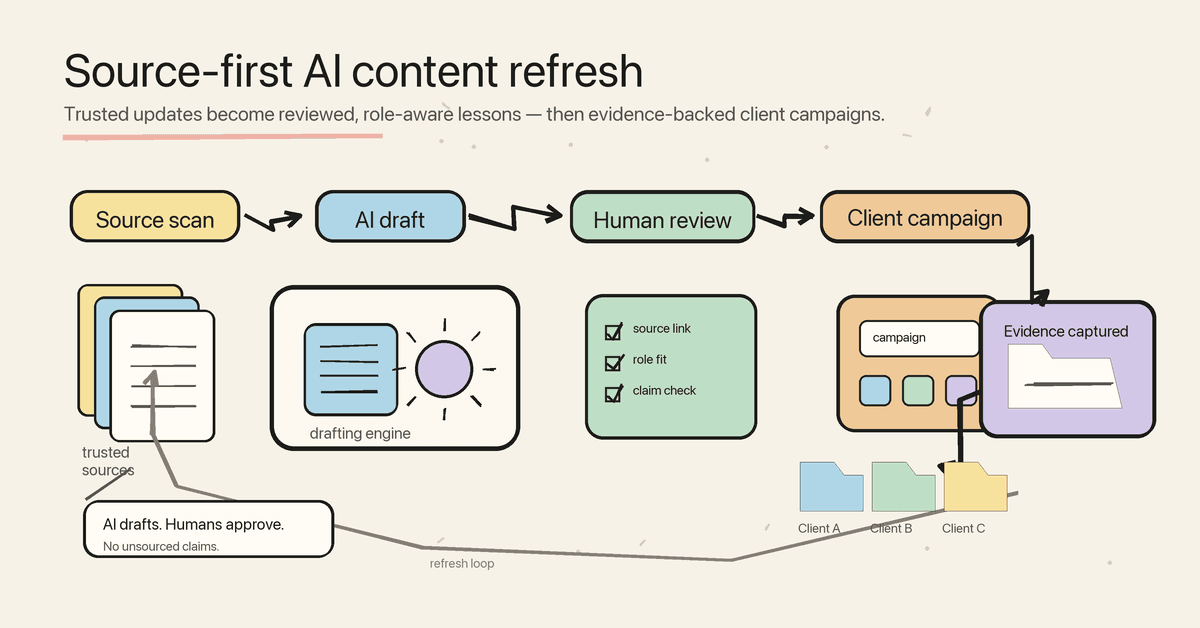
How to use AI to keep training content up to date comes down to one rule: AI can speed up the research, drafting, and variation work, but it cannot be the source of truth. MSPs need a source-first workflow that turns new threats, policy changes, client roles, and audit pressure into reviewed training updates. The useful operating model is simple: monitor trusted sources, decide what changed, draft role-aware updates with AI, verify every claim, publish through a controlled campaign workflow, and keep evidence of what changed. That gives clients fresher training without making the MSP run a content team.
Why training content goes stale
Security awareness content does not age evenly.
Some lessons are stable: verify payment changes, protect credentials, report suspicious messages, use approved tools, do not bypass MFA, and pause before sharing sensitive data.
The examples age fast. The lure changes. The channel changes. The wording changes. A lesson built around typo-heavy email scams feels thin when staff are seeing polished supplier impersonation, QR-code phishing, fake Teams messages, AI voice calls, and convincing invoices.
That gap matters for MSPs because clients do not buy awareness training as an academic exercise. They buy it because real staff need to make better decisions under pressure. If the content feels dated, generic, or detached from the client's work, employees treat it as compliance theatre.
AI can help close that gap. It can turn a new threat advisory into examples, questions, scripts, and short module updates faster than a human-only process. It can adapt a concept for finance, admin, executives, and frontline staff. It can summarise long guidance into a client-ready briefing.
But AI also creates a new failure mode: fast, polished, wrong training.
The point is not to ask AI to “write a module about phishing” and ship the answer. The point is to use AI inside a content-control workflow that an MSP can repeat across many clients.
The evidence for freshness: threats and guidance keep moving
The case for fresher training is not hype. It is visible in public guidance.
NIST's small-business phishing guidance says AI can now be used to craft increasingly convincing phishing attacks, so people should take extra care with messages asking them to click, download, transfer funds, log in, or submit sensitive information. That is a training-content change. If your client training still teaches “bad grammar” as the main phishing tell, it is behind the threat.
The FTC has warned consumers about harmful voice cloning, including scams where a call sounds like a boss or family member asking for money or sensitive information. For MSP clients, that should become a training example: verify urgent voice requests out of band using a known number.
Verizon's 2025 DBIR gives another reason to keep content current. It reports that the human element remained involved in roughly 60% of breaches, and it notes that synthetically generated text in malicious emails doubled over the prior 2 years. You do not need to turn that into panic copy. You do need to update training that assumes phishing still looks amateur.
NIST CSF 2.0's PR.AT-01 subcategory frames awareness and training as helping personnel perform tasks with cybersecurity risks in mind. The linked examples include recognising social engineering, reporting suspicious activity, complying with acceptable use policies, and refreshing training annually. NIST SP 800-53 AT-2 and AT-3 go further: training should happen at defined frequencies and when required by system changes or defined events, with role-based content updated after defined triggers.
That is the practical standard for MSPs: content freshness is not “new videos every month.” It is knowing when the risk, role, tool, policy, or evidence need changed.
What AI should and should not do
AI is useful when the MSP gives it constraints.
It is weak when it is treated as a subject-matter authority.
| AI-assisted task | Good use | Bad use | Human control needed |
|---|---|---|---|
| Source scanning | Summarise trusted guidance and flag update themes | Treat an AI answer as the source | Link every claim to NIST, CISA, FTC, NCSC, OWASP, DBIR, client policy, or another named source |
| Drafting examples | Create role-specific scenarios from verified risks | Invent breach stories or client incidents | Remove fake stats, fake brands, and unsupported details |
| Quiz writing | Turn a reviewed lesson into checks for understanding | Use trick questions or ambiguous answers | Check that answers match policy and training objective |
| Role variants | Adapt a lesson for finance, executives, admins, and general staff | Over-personalise using sensitive client data | Keep prompts free of secrets and client PII |
| Campaign refresh | Suggest which modules need updating after a threat shift | Rewrite a whole library without review | Keep version notes, approval trail, and evidence of changes |
| Reporting support | Draft client-facing summaries of what changed | Claim risk reduction without evidence | Tie reports to completion, scope, and source-backed rationale |
The safe line is clear: AI can draft, compare, summarise, and propose. Humans approve, source-check, and decide what reaches client users.
A 7-step workflow for MSPs
1. Build a source list before you prompt
Start with sources you trust. For MSP security awareness, that usually means:
- NIST guidance and framework material.
- CISA and other government advisories.
- FTC scam guidance for consumer-facing fraud patterns.
- NCSC secure AI guidance if the topic involves AI systems or AI tool use.
- OWASP GenAI Security Project material for LLM application risks.
- Verizon DBIR and other primary research reports.
- Client policies, insurer questionnaires, audit findings, and incident lessons.
Do not let the AI pick the source universe by itself. That is how weak blog posts become weak training modules.
A good prompt starts with evidence:
“Using only the source excerpts below, identify what changed for end-user security awareness training. Return 5 candidate updates, each with a source link and the staff role affected.”
That prompt makes the model a helper. It does not make the model the authority.
2. Define update triggers
A training library should not be refreshed only because the calendar says it is time.
Set triggers. Examples:
- A new phishing or social engineering pattern appears in trusted reporting.
- A client changes payment, HR, remote-work, or data-handling policy.
- The client adopts a new tool, such as generative AI, a new identity platform, or a new file-sharing workflow.
- An insurer, auditor, or regulator asks for updated evidence.
- A client incident or near miss shows staff are confused.
- A campaign report shows repeat failures on one topic.
- A role group changes risk profile, such as finance taking on supplier payments or executives approving urgent transfers.
This keeps the MSP from treating “fresh” as a content treadmill. Fresh means relevant to the client's current risk and work.
3. Ask AI for a change brief, not a finished module
The first AI output should be a change brief.
Ask for:
- What changed.
- Who is affected.
- Why it matters.
- Which existing lesson needs an update.
- What claim needs source checking.
- What should not be said.
For example, after reading NIST phishing guidance and FTC voice-cloning guidance, the change brief might say:
- Update phishing lessons that rely on bad grammar as a main warning sign.
- Add voice-cloning verification to finance, leadership, and admin training.
- Teach out-of-band verification using known contact details.
- Avoid saying AI makes every message undetectable.
- Link to the NIST and FTC pages in the source notes.
That is more useful than a finished module because it gives the MSP a reviewable decision point.
4. Draft short, role-aware updates
Security awareness content does not need to become longer every time a threat changes.
Often the best update is a short scenario, a checklist, or a 2-minute refresher.
For AI-assisted drafting, give the model the role, risk, source, tone, and action. Example:
“Draft a 200-word refresher for finance users. Topic: AI voice-cloning requests for urgent payments. Source facts: FTC says scammers use voice cloning to make requests for money or information more believable; recommended action is to verify via a known phone number. Action we want: pause, call back through the directory, record the approval path. Do not mention specific client names, vendors, or fake dollar amounts.”
That produces tighter work than a generic request for “voice phishing training.” It also keeps sensitive client data out of the prompt.
5. Run a human review checklist
Before content reaches learners, review it like a client deliverable.
Use this checklist:
- Is every factual claim backed by a named source?
- Are there any invented statistics, breach stories, or vendor claims?
- Does the advice match client policy?
- Does the lesson avoid sensitive client details?
- Is the action clear enough for a non-security employee?
- Does it fit the role group?
- Does it avoid fear theatre?
- Is the content dated or versioned?
- Does the quiz test the real behaviour, not trivia?
- Can the MSP show what changed if a client asks?
NIST's AI RMF is useful here because it treats AI risk management as a governance process, not a magic prompt. Its functions, Govern, Map, Measure, and Manage, translate well into content governance: decide who owns the update, map the risk, test the output, and manage release.
NIST's Generative AI Profile also calls out risks such as confabulation, which is a cleaner word than “hallucination” for confidently wrong output. In training-content terms, that risk shows up as fake citations, fake examples, or overconfident safety advice.
6. Publish through a controlled campaign workflow
Once the update is reviewed, publish it like a service change.
That means:
- Name the campaign or module.
- Record the source of the update.
- Define the target users or role group.
- Set assignment and reminder logic.
- Keep client or tenant separation clean.
- Capture completion and exception data.
- Save the source notes and final copy.
This is where MSP operations matter more than copywriting. A brilliant AI-assisted lesson is still a headache if the MSP has to manually copy it into 30 client environments, chase completion in spreadsheets, and rebuild evidence later.
For related MSP operating detail, see Defendwise's guides on reducing admin time on security awareness campaigns, how to onboard clients to a multi-tenant SAT platform, and how to deliver awareness training at scale for many clients.
7. Keep evidence of the update
Fresh content should leave a trail.
For each meaningful update, keep:
- Update date.
- Trigger.
- Source links.
- Summary of what changed.
- Module or campaign affected.
- Reviewer.
- Client or tenant scope.
- Assignment date.
- Completion report.
- Exceptions.
This matters for audits, QBRs, insurer conversations, and client trust. The client does not need every draft. They need proof that training is maintained, relevant, and delivered to the right people.
For compliance-heavy clients, connect this workflow to evidence-pack thinking. Defendwise has related guidance on collecting audit evidence for ISO 27001 awareness and building auditor-ready reports for clients.
What good AI-assisted training content looks like
Good content is specific without being theatrical.
For example, a weak AI-generated update might say:
“Employees must remain vigilant against sophisticated AI cyber threats that are revolutionising phishing.”
That sentence gives the learner nothing to do.
A better update says:
“If a voice call asks you to approve payment, share credentials, or change bank details, do not approve it on the call. End the call and verify through a known number or the approved internal workflow.”
That is trainable. It is also closer to the FTC's practical guidance on voice-cloning scams.
For MSPs, good content has 5 traits:
- It names the risky moment.
- It gives the user one clear action.
- It fits the user's role.
- It uses current examples from trusted sources.
- It can be tied to campaign and completion evidence.
That is the standard AI should help meet.
Mistakes to avoid
Using AI as the citation
“AI said so” is not a source. Keep source URLs in the draft and in the reviewer notes.
Feeding sensitive client data into public AI tools
Do not paste client incident details, employee names, tickets, invoices, email samples, or credentials into tools that are not approved for that use. If client specificity is needed, anonymise and minimise.
Making the training scarier instead of clearer
AI-threat content can drift into movie-villain language. That does not help employees. Teach the exact behaviour: verify, report, pause, escalate, use approved tools.
Updating content without updating evidence
If the content changes but the report pack does not, the MSP still has an audit problem. Keep the evidence trail with the campaign.
Personalising the wrong thing
Role-aware is good. Creepy is not. “Finance team payment approval scenario” is useful. “Here is a fake note from your actual CFO using your supplier names” needs much tighter approval and risk review.
Overclaiming AI-native benefits
AI-native training can help with relevance and speed. It does not remove the need for governance, review, client policy alignment, or evidence.
A practical prompt set for MSPs
Use prompts like these inside your approved AI workflow.
Source digest
“Summarise the 5 training-relevant points from these source excerpts. For each point, include the source URL, affected employee roles, and one action learners should take. Do not add facts not present in the sources.”
Content gap check
“Compare this existing lesson against the source update. List missing risks, outdated advice, unsupported claims, and suggested edits. Return only review notes, not rewritten copy.”
Role variant
“Turn this approved lesson into a finance-team version. Keep the same facts and action steps. Add payment-approval context. Do not invent statistics, client names, vendor names, or policy rules.”
Quiz draft
“Create 5 quiz questions that test behaviour, not trivia. Each answer must be clearly supported by the approved lesson text.”
Client report summary
“Draft a 120-word QBR note explaining that this month's awareness update covered AI-assisted phishing and voice verification. Use only these campaign facts: [facts]. Do not claim risk reduction or behaviour change unless shown in the data.”
The prompt wording matters less than the operating discipline: source first, draft second, review third, evidence always.
How a flat-rate MSP SAT platform helps
Keeping training content up to date is harder when every extra user, client, or campaign feels like a cost decision.
A flat-rate, multi-tenant SAT platform changes the operating question. Instead of asking which users are worth licensing, the MSP can focus on coverage, freshness, tenant separation, reminders, and client-ready reporting.
Defendwise is built for MSPs that want AI-native, white-label security awareness training at a $399/month flat fee, with unlimited users and unlimited client organisations. The fit is strongest when the MSP wants to turn training freshness into a repeatable managed service, not another seat-counting chore.
Start a free 7-day trial when you are ready to test that workflow with real client coverage.
Frequently asked questions
How can MSPs use AI to keep security awareness training content up to date?
Use AI to summarise trusted sources, draft short updates, adapt lessons by role, create quiz questions, and prepare client-facing summaries. Keep human review and source checking in the workflow before anything goes to learners.
Can AI write security awareness training without human review?
It should not. AI can produce confident but wrong guidance, weak citations, and generic examples that do not match the client's policy. Human review is what makes the content safe for client delivery.
What sources should feed AI-assisted awareness content updates?
Use high-trust sources: NIST, CISA, FTC, NCSC, OWASP, Verizon DBIR, Microsoft reports, insurer questionnaires, client policy updates, and incident lessons. Avoid treating unsourced vendor posts or social commentary as the only input.
How often should security awareness content be updated?
Set both a cadence and triggers. Annual refreshers are common, but updates should also happen after new threat patterns, tool changes, client policy changes, audit findings, incidents, or repeat campaign failures.
What are the risks of using AI for training content?
The main risks are made-up facts, fake citations, privacy leakage, generic content, and overconfident advice. Control them with approved sources, safe prompting, human review, and versioned evidence.
Does fresh training content prove compliance?
No. Fresh content supports awareness obligations, but compliance evidence still needs scope, assignments, completion records, exceptions, dates, and retained reports that match the client requirement.
What should an MSP keep as evidence of AI-assisted content updates?
Keep the trigger, source URLs, summary of changes, reviewed copy, review note, campaign or module name, target users, assignment date, completion report, exceptions, and export date.
Can Defendwise help with AI-native security awareness training for MSPs?
Defendwise is a flat-fee, AI-native, multi-tenant security awareness training platform for MSPs. It is built for white-label delivery, unlimited users, and lower-admin client training without per-seat pricing.
Sources
- NIST, AI Risk Management Framework
- NIST, Artificial Intelligence Risk Management Framework: Generative Artificial Intelligence Profile
- NIST, Phishing guidance for small business
- CSF Tools reference for NIST CSF 2.0, PR.AT-01 awareness and training
- Verizon Business, 2025 Data Breach Investigations Report
- FTC Consumer Advice, Fighting back against harmful voice cloning
- NCSC, Guidelines for secure AI system development
- OWASP, Top 10 for Large Language Model Applications / GenAI Security Project
- CISA, Secure by Design
- Microsoft, Digital Defense Report