How MSPs can bundle security awareness training without losing margin
A practical MSP guide to bundling security awareness training into managed services without creating seat-tax, admin, or reporting margin leaks.
DefendWise
DefendWise
TL;DR
MSPs can bundle security awareness training without losing margin when they treat it as a real managed service, not a cheap add-on.
That means 5 things:
- Know whether your SAT vendor cost rises per learner, per client, or per report.
- Define the client-facing scope before you sell it.
- Automate onboarding, reminders, and reporting wherever possible.
- Use contract true-ups or user bands if your vendor charges per seat.
- Prefer flat-fee, multi-tenant SAT when you want to include training across every client without turning every new employee into a margin event.
Security awareness training belongs in the MSP stack. NIST SP 800-50 describes awareness and training as a structured program lifecycle, not a one-off video. CISA's SMB phishing guidance tells small businesses that phishing training helps staff recognize and report scams, and that once-a-year training is not enough because threats keep changing.
The margin problem is not the training. The margin problem is bundling a recurring operational service without pricing the recurring operational work.
Why SAT belongs in the MSP bundle
Security awareness training is no longer a nice-to-have extra for clients that already bought every other security control.
Clients are being asked about training by insurers, auditors, boards, procurement teams, and internal leadership. They want staff to recognize phishing, avoid suspicious links, report strange requests, and understand the basic habits that reduce day-to-day risk.
CISA's phishing guidance for small and medium businesses is blunt: attackers use phishing to steal credentials, access business accounts, and install ransomware. It recommends phishing training, regular reinforcement, and clear reporting paths for suspicious messages. It also says once-a-year training is not enough as threats evolve.
NIST SP 800-50 frames awareness and training as a program lifecycle: design the program, develop materials, implement it, then review and improve after implementation. That matters for MSPs because clients do not only need a training link. They need a repeatable operating rhythm.
That is exactly the kind of work MSPs are already trusted to run.
A strong MSP bundle can turn security awareness training into:
- a standard part of the managed security stack;
- a client-retention touchpoint for QBRs and renewals;
- a practical response to phishing and social-engineering risk;
- an evidence source for cyber insurance and framework conversations;
- a visible service that reinforces the MSP's advisory role.
But only if the economics work.
The bundle trap: selling predictability while buying variability
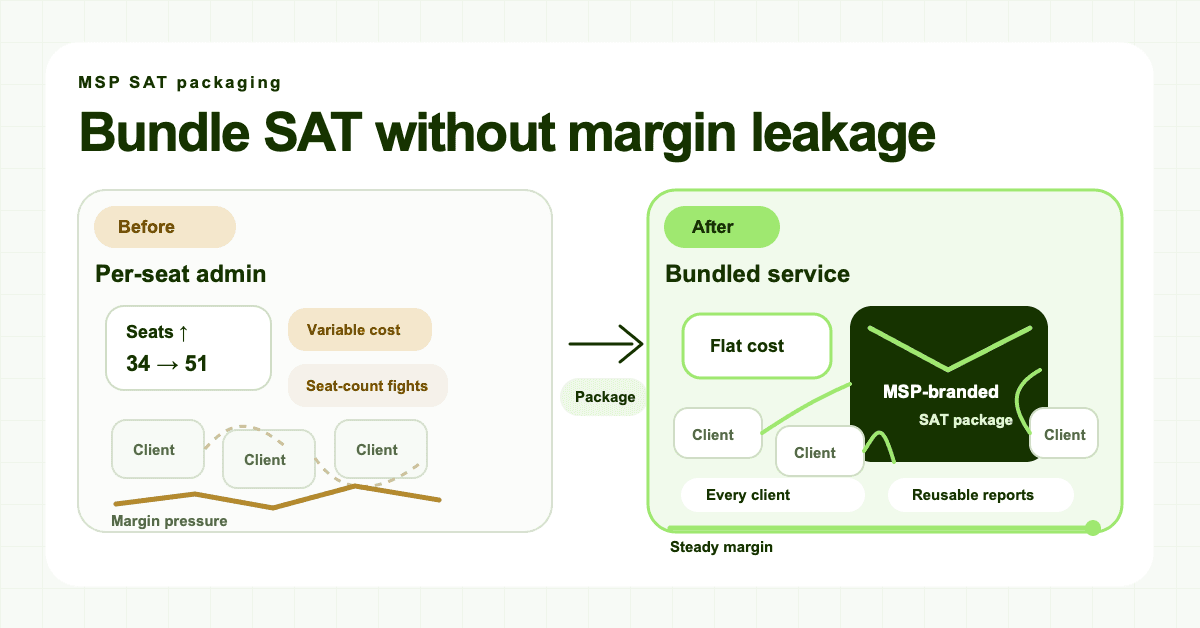
The fastest way to damage margin is to sell the client a predictable managed service while buying SAT from a vendor whose costs move in a different direction.
Example:
- You sell a managed security package for a fixed monthly fee.
- You include security awareness training as part of the package.
- Your SAT vendor charges per active learner.
- The client grows from 35 users to 70 users.
- The client still pays the same package fee, but your vendor bill rises.
That is the seat-tax problem.
It does not always look dramatic on one client. A small per-learner charge can feel harmless. The problem compounds across the book of business. Every client hire, seasonal worker, contractor, stale mailbox, or forgotten inactive user can become a small cost leak.
Then the manual work adds another leak.
Someone still has to import users, remove inactive users, set campaigns, chase completions, answer client questions, produce reports, prepare QBR evidence, and explain gaps when a client asks who has not completed training.
If the package only prices the software and not the operating loop, margin gets eaten twice: once by vendor cost, once by staff time.
The MSP bundle margin test
Before you put SAT into a managed services package, answer these questions.
| Question | Why it matters | Margin-safe answer |
|---|---|---|
| What is the vendor billing unit? | Learner, active user, tenant, domain, or package tier all behave differently. | The team knows exactly what triggers a bill. |
| Does cost rise with every client user? | Per-seat pricing can punish broad coverage. | Either client pricing true-ups with user count, or vendor cost is flat. |
| Who handles onboarding? | Manual setup becomes COGS. | Directory sync, inherited templates, or a repeatable checklist. |
| Who handles reminders? | Chasing completion manually kills margin. | Automated reminders and escalation rules. |
| How are reports produced? | Client-ready evidence is part of the service, not an afterthought. | Tenant-separated reports are generated without spreadsheet work. |
| Is the service white-labeled? | MSPs should own the client relationship. | Client-facing portal, email, reports, certificates, and URL carry the MSP brand. |
| What happens when users change? | Stale users create cost and reporting noise. | Onboarding/offboarding is reviewed on a set cadence or automated. |
| What happens when the client grows? | Growth should not create surprise margin loss. | Contract bands, true-ups, or flat vendor cost handle expansion. |
If any row is vague, the bundle is not ready.
That does not mean you cannot sell SAT. It means the package needs rules before it needs a launch email.
Three ways to price bundled SAT
There is no single right pricing model for every MSP. The right model depends on how you buy the service and how you sell managed services today.
1. Pass-through SAT as a visible line item
This is the simplest model when your vendor charges per user.
The client sees SAT as a separate line or add-on. If the client has more users, the SAT line increases. Your margin is protected because the variable cost is visible.
The downside is commercial friction. Every user-count discussion becomes a price discussion. SAT can feel like another product bolted onto the invoice instead of a managed service outcome.
Use this model when the client expects line-item transparency, your vendor cost moves directly per learner, you do not want to absorb growth risk, or SAT is still optional in your stack.
2. Bundle SAT with client user bands
User bands keep the client experience simpler while protecting the MSP from runaway per-seat cost.
For example:
- 1–25 users included in the base package;
- 26–50 users in the next package tier;
- 51–100 users in a higher tier;
- 101+ users quoted or reviewed.
This is often a good compromise when you buy per user but want to sell a cleaner managed service.
The important part is the true-up rule. If the client moves from 45 users to 68 users, when does pricing change? Monthly? Quarterly? At renewal? Only after a threshold is sustained for 30 days?
Write that down before the first invoice.
3. Bundle SAT into the managed security package with flat vendor cost
This is the cleanest model when your SAT platform is built for MSPs and does not charge per learner.
If your vendor cost is flat, you can include training across every client without asking whether each new user is worth the extra licence cost. The MSP can sell a stronger package and train more users without a vendor-side seat tax.
That is the DefendWise flat-fee model: $399/month, unlimited users, unlimited client organisations, and every feature included. The point is not only the price. The point is the pricing shape. The MSP can package SAT as part of a managed security service without a new vendor charge for every learner.
Use this model when you want SAT included by default, broad coverage is part of the security promise, the MSP owns the client relationship, reporting and reminders need to scale across many tenants, and you want simple internal margin modelling.
Flat vendor cost does not remove the need to price your work. It removes one of the biggest sources of hidden variability.
What the bundled SAT service should include
A margin-safe bundle needs a clear service definition.
Do not sell "security awareness training" as a vague noun. Sell the operating outcome.
1. Covered users
Define who is included.
Most MSPs should cover employees, contractors, seasonal staff, and new starters for real client organisations. You may exclude shared mailboxes, service accounts, ex-employees, test users, and accounts that are not actual learners.
This protects security coverage and cost control.
2. Training cadence
Define the rhythm.
For example:
- onboarding training for new users;
- recurring phishing and social-engineering modules;
- periodic refreshers for password hygiene, MFA, and reporting suspicious activity;
- client-specific modules where needed.
CISA's advice that once-a-year training is not enough is useful here. MSPs do not need to promise magic behaviour-change metrics. They do need to show that training is regular, relevant, and reinforced.
3. Onboarding process
Define how users enter the program.
Manual CSV imports may work for the first 3 clients. They usually do not scale to 30. If your platform supports Microsoft 365 sync or repeatable client setup, make that part of the standard process.
DefendWise positions automated onboarding around Microsoft 365 sync, learner enrollment, reminders, escalations, and reporting. That is the right direction for MSP packaging: less recurring admin, fewer one-off setup tasks, and fewer forgotten users.
4. Reminder and escalation rules
Define what happens when people do not complete training.
If your team manually chases every overdue learner, you have not bundled a service. You have bundled a recurring interruption.
Set a default cadence: initial enrollment email, reminder after a set number of days, manager or client-contact escalation when overdue, and report summary for the client owner.
Keep the rules simple enough to run every month.
5. Client-ready reporting
Define the evidence.
A bundled SAT service should not end with "the training exists." Clients need to see who was assigned, who completed it, who is overdue, what topics were covered, and what is coming next.
That is where tenant-separated reporting matters. A global dashboard might help your team, but clients need their own report.
DefendWise's public product pages describe branded PDFs, reports, certificates, multi-tenant control, and white-label delivery. Those are safe, useful claims for this article because they are public product claims. The stronger claim to avoid is "this makes you compliant." It does not. It helps produce training evidence clients can use in insurance, audit, and QBR conversations.
The operating checklist for MSPs
Use this checklist before launching bundled SAT.
Commercial setup
- Choose pricing model: pass-through, user bands, or bundled flat-fee.
- Document what happens when a client crosses a user band.
- Decide whether SAT is included in all managed security packages or sold as an add-on.
- Add contract language for active users, true-ups, and client scope.
- Price internal admin time, not only vendor licence cost.
Service design
- Define covered users and excluded accounts.
- Set training cadence and topic categories.
- Choose onboarding source of truth, such as Microsoft 365.
- Define reminder and escalation cadence.
- Define monthly or quarterly report format.
Operational controls
- Assign an internal owner for SAT exceptions.
- Audit inactive users on a set schedule if billing is per user.
- Keep tenant data separated by client.
- Use inherited templates where possible.
- Track client-specific exceptions so they do not become hidden labour.
Client communication
- Explain the service in outcome terms: training, reminders, reporting, and evidence.
- Avoid promising guaranteed behaviour change, guaranteed compliance, or breach prevention.
- Tell clients how often reports arrive.
- Make reporting useful for QBRs, insurance questionnaires, and internal accountability.
- Keep the MSP brand visible if SAT is part of your managed service.
What to avoid
Avoid "free SAT" language
If you include SAT in a managed package, it is not free. It is built into the service. Calling it free makes it harder to protect margin later and undervalues the work.
Say "included in your managed security package" instead.
Avoid unsupported compliance promises
Training can support evidence conversations. It does not make a client compliant by itself.
Safe language: "helps produce training evidence," "supports cyber insurance and audit conversations," and "gives clients a report they can use in QBRs."
Unsafe language: "makes clients compliant," "guarantees insurance approval," and "eliminates human risk."
Avoid a bundle your tech stack cannot operate
A bundle is a promise to run the service repeatedly.
If your team has to rebuild campaigns, export reports manually, clean user lists by hand, and chase every learner one by one, the bundle is not ready to scale.
Start with fewer clients, measure the operating load, and then standardise.
Avoid vendor branding that weakens the MSP relationship
If the client receives training emails, portal links, reports, and certificates from a third-party vendor, the MSP may be doing the work while the vendor gets the credit.
That is why white-label delivery matters in MSP SAT. DefendWise publicly claims white-label portal, emails, reports, certificates, and login URL. For an MSP-owned service, those client-facing surfaces are not cosmetic. They reinforce who the client trusts.
How DefendWise fits the bundle model
DefendWise is built around the MSP version of this problem.
The safe public claims are:
- $399/month flat pricing;
- unlimited users;
- unlimited client organisations/subclients;
- white-label portal, emails, reports, certificates, and login URL;
- multi-tenant control;
- automated onboarding;
- Microsoft 365 sync;
- automated reports;
- Start Free 7-Day Trial.
Those claims matter because they map to the bundle margin test.
Flat pricing helps with vendor-cost predictability. Unlimited users and client organisations help with broad coverage. White-label delivery helps the MSP own the relationship. Multi-tenant control keeps client management from becoming a pile of separate portals. Automated onboarding and reports reduce the recurring admin loop.
The practical buyer question is simple:
Can your MSP include SAT for every client without turning every new learner into a new vendor bill or every report into a manual task?
If not, the bundle will probably leak margin.
If yes, SAT becomes much easier to package as part of a managed security offer.
A simple bundled SAT offer structure
Here is a clean structure MSPs can adapt.
Service name: Security Awareness Training and Reporting
Included:
- onboarding training for new users;
- recurring security awareness modules;
- phishing and social-engineering education;
- automated reminders;
- tenant-separated reporting;
- quarterly report review or QBR evidence pack;
- MSP-branded portal and emails where supported.
Client responsibilities:
- provide accurate user source of truth;
- nominate a client contact for overdue-user escalation;
- confirm onboarding/offboarding changes;
- review reports and follow up with internal managers.
MSP responsibilities:
- configure the client tenant;
- monitor completion;
- send reminders or use automated reminders;
- provide client-ready reporting;
- maintain the training cadence;
- flag unusual non-completion or access issues.
Pricing note:
- If the MSP buys SAT per user, attach a user band and true-up rule.
- If the MSP buys flat-fee MSP SAT, include it in the managed package and price for service value, not seat count.
This structure is simple enough for sales, service delivery, and clients to understand.
The bottom line
Bundled security awareness training can be a strong MSP offer.
It gives clients a clear answer to phishing and human-risk education. It creates evidence for QBRs, insurance, and audit conversations. It reinforces the MSP as the managed security advisor.
But it only works when the bundle is priced and operated like a managed service.
If your vendor charges per learner, protect yourself with pass-through pricing, user bands, true-ups, and inactive-user reviews.
If you want SAT included across every client by default, use a flat-fee, multi-tenant, white-label platform that does not turn broad coverage into a seat tax.
That is the economic difference.
Security awareness training should make the MSP package stronger. It should not become another hidden margin leak.
Header image brief for Picasso
- Source TL;DR: MSPs can bundle security awareness training safely when vendor cost, client scope, automation, and reporting are designed before launch. The visual should show SAT moving from a margin-leaking add-on into a clean managed-service bundle.
- Primary pillar: SAT pricing / flat fee.
- Infographic thesis: "Bundle SAT without a seat-tax leak." Show a messy per-seat bundle on the left and a clean flat-fee managed-service package on the right.
- Suggested layout: Before/after economics board with a central arrow labelled "standardise the service."
- Short on-image text candidates: "Per-seat leak", "Manual admin", "Flat vendor cost", "White-label reports", "Managed service bundle".
- Key objects: MSP service package box, seat counter with small red leak marks, flat monthly card, client stack, automated reminder icon, branded report/certificate.
- Avoid: fake ROI percentages, competitor logos, compliance seals, hacker hoodies, unsupported savings numbers, tiny dashboard text, and any claim that training guarantees compliance or breach prevention.
- Crop needs: 1200x628 blog/OG, plus social-safe 1200x627.