Email templates for branded security awareness campaigns: an MSP guide
Email templates for branded security awareness campaigns help MSPs launch clearer training without confusing clients or leaking trust.
DefendWise
DefendWise
TL;DR
Email templates for branded security awareness campaigns are not filler copy. For MSPs, they are the operating layer between the platform, the client, and the learner. A good template tells users what is happening, why it matters, what action to take, how long it will take, and where to get help.
The best branded security awareness emails are clear, short, and repeatable. They use the MSP or client brand consistently, avoid fake urgency, support phishing-reporting behaviour, and leave a record that can be shown later in a QBR, audit request, or cyber insurance questionnaire. The goal is not prettier training emails. It is a campaign workflow clients trust and MSP teams can reuse across many tenants.
What are email templates for branded security awareness campaigns?
Email templates for branded security awareness campaigns are reusable messages that help an MSP launch, remind, report, and close training across client organisations.
They usually cover moments like:
- a client launch announcement;
- a first training assignment;
- an overdue reminder;
- a phishing simulation pre-brief or post-brief;
- a reporting or QBR summary;
- a manager escalation;
- an evidence-pack handoff after a campaign.
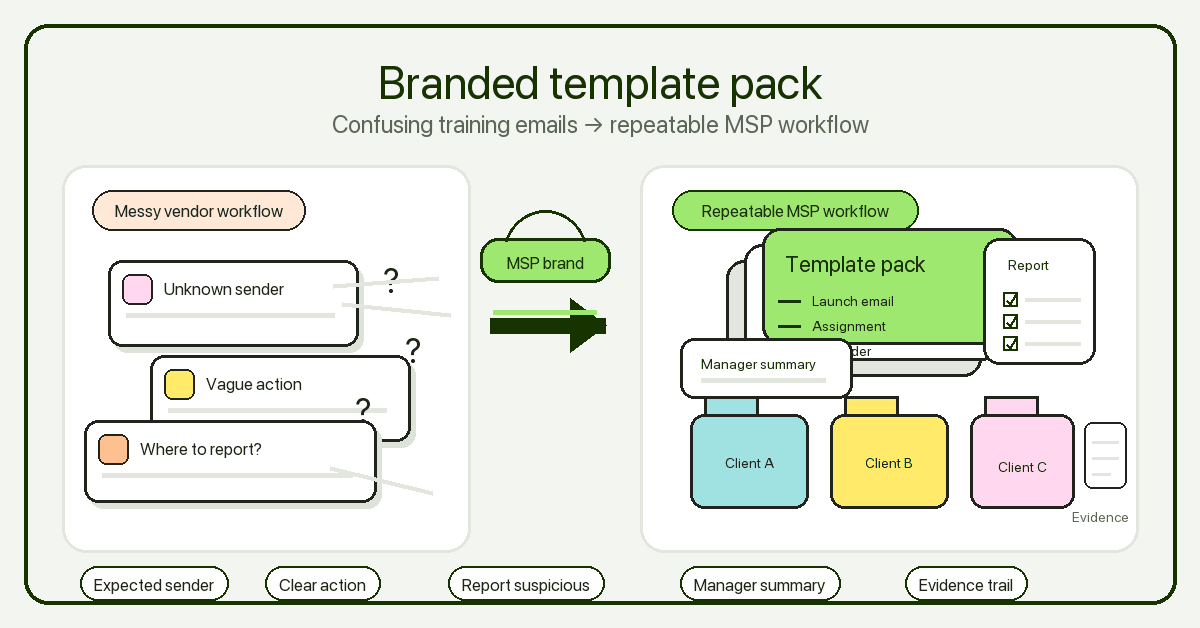
For a single internal IT team, these templates may be ordinary comms. For an MSP, they are service-delivery assets. They decide whether the learner sees a coherent security programme or a strange third-party email from a vendor they do not recognise.
That distinction matters because security awareness sits inside a trust problem. NIST’s phishing guidance for small businesses says phishing uses convincing messages disguised as trusted sources to trick people into opening harmful links or sharing information. CISA, NSA, FBI, and MS-ISAC describe phishing as a social-engineering method used to steal credentials, deploy malware, and gain initial access. If the training email itself looks unexplained, unbranded, or disconnected from the MSP relationship, users may ignore it, report it as suspicious, or click it for the wrong reason.
Branded templates help remove that avoidable ambiguity.
Why this matters for MSPs
MSPs do not send one campaign to one workforce. They manage many client audiences, each with different names, brands, managers, risk levels, insurance pressure, audit expectations, and support habits.
Without templates, every launch becomes copy work:
- Which sender should users expect?
- Should the client CEO or the MSP sign the launch email?
- What does the first assignment message say?
- How do we chase overdue users without sounding like spam?
- How do we explain phishing simulations without training people to game the test?
- What do managers receive after completion?
- What copy goes into the QBR report?
A template does not remove judgement. It removes avoidable reinvention.
NIST SP 800-50 Rev. 1 frames cybersecurity and privacy learning as a lifecycle programme that should encourage behaviour change, support risk management, use metrics, and improve over time. That is the right mental model for MSPs. The email copy is not separate from the programme. It is one of the places where the programme becomes visible to users.
CISA’s Secure Our World campaign takes the same practical direction: simple actions, repeated clearly, help people recognise and report phishing, use strong passwords, turn on MFA, and update software. A training email should sound like that: plain, direct, and specific.
What MSPs actually need in branded training email templates
The useful template set is smaller than most teams think. Start with the messages that happen in every client rollout, then add client-specific variations only where they change behaviour.
| Template | When to use it | What it must include | Common MSP mistake |
|---|---|---|---|
| Client launch announcement | Before the first campaign | Why training is starting, who it applies to, sender identity, start date, support path | Sending from an unfamiliar vendor identity with no warning |
| First assignment email | When training opens | Required action, deadline, expected time, link behaviour, help contact | Overloading the message with policy language |
| Reminder email | Before due date | What is overdue, due date, how to complete, manager visibility if relevant | Making reminders sound like phishing bait |
| Phishing reporting prompt | Before and during campaigns | How to report suspicious messages, what not to do, where to ask | Teaching red flags but not reporting behaviour |
| Post-simulation learning note | After a simulation | What pattern was tested, lesson, next step, no-shame tone | Turning the result into blame or embarrassment |
| Manager summary | After a campaign window | Completion status, overdue groups, exceptions, follow-up action | Sending raw exports without interpretation |
| QBR or evidence handoff | Monthly, quarterly, or audit prep | Scope, audience, dates, completion, exceptions, copy of campaign theme | Treating screenshots as the whole evidence pack |
The launch announcement and first assignment email matter most. If users do not understand the sender, purpose, and expected action, the rest of the campaign starts with avoidable friction.
The minimum template set
1. Client launch announcement
Purpose: tell users that training is coming before the platform sends the first assignment.
Use this when a client is new to the programme, when the sender identity changes, or when the MSP is switching from vendor-branded training to MSP-branded delivery.
A good launch email includes:
- the client or MSP brand users should expect;
- why the programme is being introduced;
- who must complete it;
- when it starts;
- how long the first module should take;
- the support contact;
- how to report suspicious emails.
Example structure:
Subject: Security awareness training starts next week

Hi {{first_name}},

{{client_name}} is starting a security awareness training programme managed by {{msp_name}}.

You will receive a training assignment from {{sender_name}} on {{start_date}}. The first module should take about {{time_required}}.

If a message looks suspicious, do not click unknown links. Use {{reporting_method}} or contact {{support_contact}}.

Thanks,
{{signature}}
Keep it short. This is not the place to sell the full cyber strategy.
2. First training assignment email
Purpose: get users into the assigned training without creating confusion.
The assignment email should explain exactly what to do. Avoid aggressive urgency, weird countdowns, or unexplained login prompts. Microsoft’s phishing guidance calls urgent calls to action and threats a common phishing signal. Training emails should not copy attacker pressure tactics unless they are clearly part of a simulation and handled ethically.
A practical assignment email includes:
- the training title;
- the deadline;
- expected time;
- the link or portal name;
- what to do if the link does not work;
- where to ask for help.
If the email includes a link, make the link text plain. Do not hide it behind a vague “click here”.
3. Reminder email
Purpose: nudge completion without sounding like a fake HR or IT warning.
Reminder copy should be boring on purpose. The more it tries to sound dramatic, the more it resembles the attacks the training is trying to teach people to question.
Use language like:
Subject: Reminder: complete your security awareness training by {{due_date}}

Hi {{first_name}},

You still have {{module_name}} assigned in {{portal_name}}.

Please complete it by {{due_date}}. It should take about {{time_required}}.

If you have already completed it, no action is needed. If you need help, contact {{support_contact}}.
That is enough.
4. Phishing reporting prompt
Purpose: teach action, not only recognition.
NIST tells small businesses to teach employees how to spot and report a phish. NCSC also emphasises reporting scam emails, texts, websites, adverts, and calls, and says reporting can help remove scam infrastructure. A campaign email should make the reporting path visible before users need it.
A template can say:
If you receive a message that asks for a password, payment, MFA code, unusual approval, gift card, file download, or urgent account action, pause first. Do not reply or forward it to a personal address. Report it using {{reporting_method}} or send it to {{security_contact}}.
The reporting path should be client-specific. “Tell IT” is not enough if the client has 4 different support channels.
5. Post-simulation learning note
Purpose: turn a simulation into learning rather than shame.
CISA’s phishing guidance talks about phishing as an attack cycle. Microsoft’s Attack Simulation Training documentation describes benign simulations that test security practices and train employees. The value is the learning loop. A post-simulation message should explain the pattern tested and the safe behaviour expected next time.
Avoid leaderboards, public shaming, or “gotcha” copy. For MSPs, this is also a client-retention issue. Users who feel tricked or embarrassed are less likely to trust the next security message.
A better pattern:
Subject: What this week’s phishing simulation tested

This week’s simulation tested {{pattern}}, such as {{example_indicator}}.

If you spotted it or reported it, good. If you clicked, the next step is simple: slow down, check the sender and link, and report anything that asks for credentials, payment, MFA codes, or unexpected file access.

No one is in trouble. The goal is to practise before a real attacker asks.
Deliverability and trust: SPF, DKIM, and DMARC
Branding is not only the logo. It is also whether the email is technically credible.
Google’s email sender guidelines tell senders to authenticate each sending domain and recommend SPF, DKIM, and DMARC. Google notes unauthenticated mail may be marked as spam or rejected. SPF helps prevent unauthorized senders from sending messages that appear to come from your domain. DKIM helps receiving servers verify that the domain owner sent the message. DMARC tells receiving servers what to do when SPF or DKIM fails and helps domain owners monitor possible impersonation.
For MSP security awareness campaigns, the practical lesson is simple: do not ask users to trust training emails that the mail system itself does not trust.
Before launching a branded campaign, check:
- Which domain appears in the From address?
- Is that sender expected by the client?
- Are SPF and DKIM configured for the platform or sending service?
- Is DMARC present for the domain?
- Does the link domain match the portal users were told to expect?
- Will security tools rewrite links in a way users need to understand?
- Does the client know what sender and subject lines are coming?
This is where MSPs can lose trust quickly. A white-label campaign that lands in spam, fails authentication, or sends users to an unexplained domain teaches the wrong lesson.
Step-by-step: build the template pack
1. Pick the sender model
Decide whether training emails come from the MSP, the client, or a named training address. The answer can vary by client, but the rule should be documented.
MSP-branded sender works when the MSP owns the managed-security relationship. Client-branded sender may work better where employees respond to internal HR or IT messages. Either way, users need a pre-brief.
2. Define the fixed fields
Every template should have a few variables your team fills in:
- client name;
- MSP name;
- sender name;
- portal name or URL;
- support contact;
- reporting method;
- deadline;
- expected time;
- manager or owner;
- campaign name.
If a variable is often blank, it is probably not a template field. Cut it.
3. Write for the learner, not the buyer
The buyer cares about risk, compliance, coverage, and reporting. The learner cares about what they have to do and whether the email is legitimate.
Use short sentences. Avoid platform jargon. Tell them what will happen next.
4. Add the reporting behaviour
Every template does not need a long phishing lesson. But the launch and assignment emails should remind users how to report suspicious messages.
This reinforces the habit NIST and NCSC both point toward: recognise and report, not only recognise.
5. Build a manager version
Managers need different copy. They need completion status, exceptions, and follow-up action. They do not need a raw export pasted into an email.
A manager summary should answer:
- Who was in scope?
- What was assigned?
- What is complete?
- Who is overdue?
- What exceptions exist?
- What action is needed this week?
6. Keep the evidence copy
For audit or insurance use, preserve the campaign language. Keep the launch email, assignment email, reminder copy, audience, dates, and status. That does not make a client compliant by itself. It does make the training story easier to explain later.
7. Review once, reuse many times
Dan, the MSP owner, or the client stakeholder should not have to approve every reminder from scratch. Get the template pack approved once, then reuse it with client-specific variables.
That is how content becomes operations.
What good looks like
A good branded campaign email has 7 traits:
- The sender is expected.
- The brand matches the client or MSP relationship.
- The purpose is obvious in the first 2 lines.
- The action is specific.
- The deadline is clear but not panic-driven.
- The support and reporting paths are visible.
- The copy can be saved as evidence later.
Here is the bar: if a non-technical employee asks “is this real?”, the answer should already be in the launch email, sender identity, portal URL, and support path.
Mistakes to avoid
Making training emails look like phishing emails
Awareness training should teach careful behaviour. If every legitimate training email uses vague links, unexplained urgency, unfamiliar sender domains, and pressure language, users learn confusion.
Treating templates as marketing copy
Training emails are operational messages. They should be clear before they are clever. Save sharper language for LinkedIn, sales pages, or internal enablement.
Over-customising every client
Customisation feels client-friendly until it becomes unmanageable. Standardise the structure. Customise the brand, sender, support route, deadline, and any client-specific policy line.
Leaving managers out
If managers only hear about training after users are overdue, they become escalation targets instead of programme owners. Give them a simple summary before completion problems build up.
Forgetting the evidence trail
If the MSP cannot show what message was sent, to whom, and when, the email campaign becomes harder to defend later. Save the copy and the campaign metadata.
Framework and evidence mapping
Security awareness email templates can support several common evidence conversations, as long as the MSP does not overclaim.
| Evidence need | Template record to keep | What it can support |
|---|---|---|
| Awareness programme launch | Launch email, audience, date, owner | Shows the client communicated the programme clearly |
| Training assignment | Assignment email, module name, due date, recipient group | Shows what users were asked to complete |
| Reminder process | Reminder copy, send dates, overdue audience | Shows follow-up happened before escalation |
| Reporting behaviour | Phishing reporting instructions, support channel | Shows users were told how to report suspicious messages |
| Simulation learning | Post-simulation note, tested pattern, learning action | Shows simulation was tied to education, not punishment |
| Manager follow-up | Manager summary, overdue list, exception notes | Supports accountability and QBR discussion |
| Audit or insurance response | Evidence handoff email, scope, dates, completion/export links | Helps explain what was done and what remains open |
For compliance-sensitive clients, use careful language. Training emails can support evidence for a security awareness programme. They do not prove ISO 27001 certification, Essential Eight maturity, or cyber-insurance acceptance on their own.
How a flat-rate MSP SAT platform helps
A flat-rate, multi-tenant SAT platform helps when it lets MSPs turn campaign communication into a repeatable branded workflow rather than a client-by-client copy project.
DefendWise is built for MSPs with $399/month flat pricing, unlimited users, unlimited client organisations, white-label delivery, multi-tenant management, automated onboarding, AI-native training content, Microsoft 365 sync, Zapier integration, and branded reporting. The safe product point for this article is not “every email scenario is magically solved.” It is that MSPs need the platform and the template pack to work together: brand, launch, train, remind, report, and keep evidence without adding another admin queue.
Useful related reading during publish:
- DefendWise home page
- The hidden cost of managing security awareness training
- How to onboard clients to a multi-tenant SAT platform
- How to build branded training portals for clients
- Bulk import users to a multi-tenant training platform
Frequently asked questions
What are email templates for branded security awareness campaigns?
They are reusable messages for launch, assignment, reminders, phishing reporting, manager follow-up, and reporting. For MSPs, the useful version keeps the MSP or client brand visible while standardising the workflow across many client tenants.
Why should MSPs use branded security awareness emails?
Users are more likely to trust a training workflow when the sender, brand, portal, and support path match the relationship they already know. Branded emails also help MSPs deliver SAT as a managed service rather than a vendor handoff.
What should a training announcement email include?
It should include the programme purpose, sender identity, audience, start date, expected time, support contact, and suspicious-email reporting path. The goal is to remove confusion before the first assignment arrives.
Should phishing simulation emails be announced in advance?
Announce the programme, not every exact simulation. Users should know simulations are part of the training programme and how to report suspicious messages, but they do not need the date and payload of each test.
How do SPF, DKIM, and DMARC affect branded training emails?
They help mail systems verify the sending domain. For MSPs, that matters because a training email that fails authentication or lands in spam undermines the trust the campaign is meant to build.
Can branded training emails support compliance evidence?
Yes, as supporting records. Keep the copy, audience, dates, reminders, completion summaries, exceptions, and manager handoff. Do not claim that the email templates alone prove compliance.
Where does DefendWise fit?
DefendWise helps MSPs deliver security awareness training under their own brand with flat-fee pricing, unlimited users, multi-tenant management, automated onboarding, and branded reporting. The email template pack turns those platform pieces into a cleaner client communication workflow.
Sources
- NIST, SP 800-50 Rev. 1: Building a Cybersecurity and Privacy Learning Program
- NIST, Phishing guidance for small businesses
- CISA / NSA / FBI / MS-ISAC, Phishing Guidance: Stopping the Attack Cycle at Phase One
- CISA, Secure Our World
- Microsoft Learn, Simulate a phishing attack with Attack simulation training
- Microsoft Support, Protect yourself from phishing
- Google Workspace Admin Help, Email sender guidelines
- NCSC, Phishing: spot and report scam emails, texts, websites and calls
- CIS, CIS Critical Security Controls Version 8
- DefendWise, Flat-fee human risk management for MSPs