Human risk reduction metrics for training programs
Human risk reduction metrics help MSPs prove training is changing risky behavior, not just collecting completions.
DefendWise
DefendWise
TL;DR
Human risk reduction metrics for training programs show whether security awareness training is changing risky behavior.
Completion rate still matters. It proves users were assigned and finished training. But it does not prove they report phishing faster, stop repeating the same risky actions, or understand what to do when a finance impersonation email lands on a busy Tuesday.
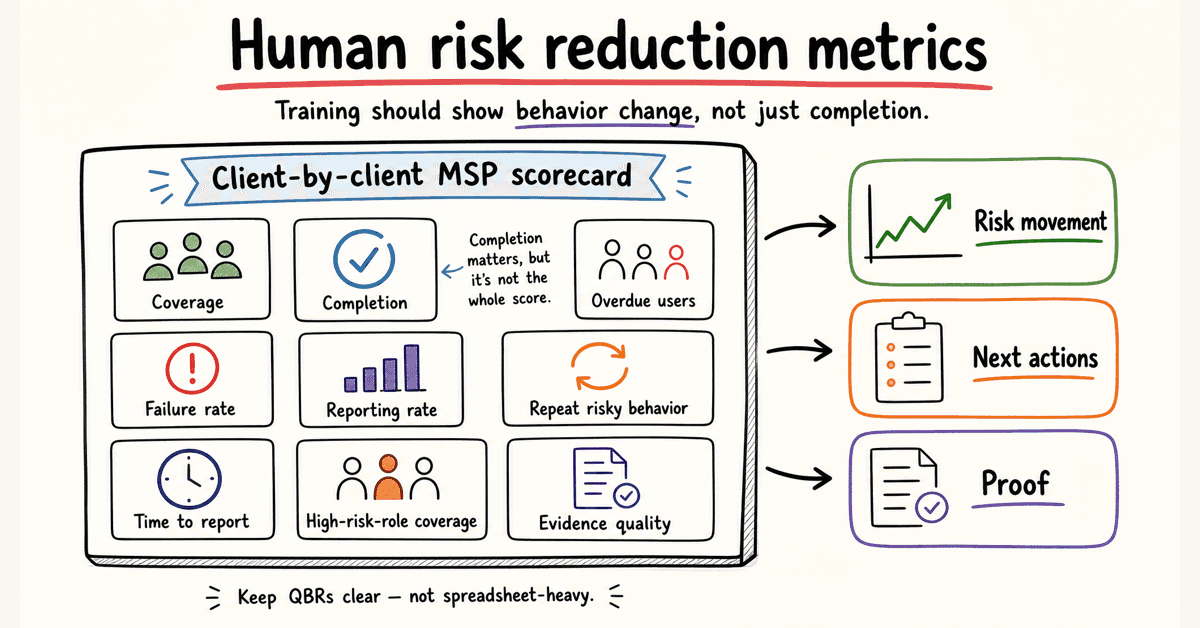
For MSPs, the useful scorecard is client-by-client: coverage, completion, overdue users, phishing failure rate, reporting rate, repeat risky behavior, time to report, high-risk-role coverage, and evidence quality.
The point is not to drown clients in metrics. The point is to show risk movement, next actions, and proof without turning every QBR into spreadsheet work.
What human risk reduction metrics for training programs mean
Human risk is the chance that people will help an attack succeed.
That can mean clicking a phishing link, opening a dangerous attachment, approving a fake payment request, reusing credentials, ignoring MFA prompts, mishandling client data, failing to report a suspicious email, or working around security controls to get through the day.
A training program is supposed to reduce that risk.
So a human risk reduction metric should answer a practical question: is this group safer than it was before?
That means measuring behavior and program coverage, not only participation.
NIST SP 800-50 Rev. 1 says cybersecurity and privacy learning programs should encourage behavior change as part of risk management, and should include metrics and evaluation methods to improve the program over time in Building a Cybersecurity and Privacy Learning Program.
CIS Control 14 puts the same idea in operational language. Its goal is to establish and maintain a security awareness program that influences behavior and reduces cybersecurity risk, according to CIS Control 14: Security Awareness and Skills Training.
For an MSP, that translates into 2 jobs:
- Run the training program across many client tenants.
- Show each client whether human risk is moving in the right direction.
The second job is where many SAT reports fall short.
A dashboard can say "training complete." A better report says, "Training is complete, phishing reports are up, repeat failures are down, finance is still a risk group, and these 9 users need follow-up before the renewal pack goes out."
That is a metric an MSP can act on.
Why completion alone is a weak human risk metric
Completion rate is the easiest number to report.
It is also the easiest number to overvalue.
A 97% completion rate can still hide bad coverage, weak reporting culture, repeat clickers, stale content, or a risky executive group that skipped training. It can also hide the fact that users completed the module because the due date was yesterday, not because the behavior changed.
This does not make completion useless.
It makes completion a floor.
CIS Control 14's assessment specification includes training compliance metrics such as the percentage of workforce members who received initial training and the percentage whose training is up to date in the CIS Controls Assessment Specification for Control 14. That is important evidence.
But completion alone cannot answer the client question MSPs eventually get:
"Is this working?"
To answer that, track the change in risky behavior.
Human risk shows up before the incident ticket
The Verizon 2025 Data Breach Investigations Report analyzed 22,052 real-world incidents and 12,195 confirmed breaches. It reports that human involvement in breaches was around 60% in the 2025 dataset in the 2025 DBIR.
That does not mean training fixes 60% of breaches. Nobody serious should claim that.
It means the human layer is still a major part of the risk story. For MSP clients, that makes training metrics worth measuring properly.
Reporting behavior matters as much as clicking behavior
A phishing simulation click rate tells you who took the bait.
A reporting rate tells you whether the workforce can become an early-warning system.
CISA, NSA, FBI, and MS-ISAC tell organizations to educate users on suspicious emails, links, and the importance of reporting suspicious items in their Phishing Guidance: Stopping the Attack Cycle at Phase One.
CISA's small-business phishing page also says employees should know to whom and how to report suspicious emails or phishing attempts in Teach employees to avoid phishing.
That gives MSPs a clean reporting angle:
- Who clicked?
- Who reported?
- Who did both?
- Who ignored the message?
- How long did reporting take?
A client with a modest click rate and a rising report rate may be moving in the right direction.
A client with a falling click rate but almost no reports may still be blind when a real lure arrives.
Difficulty changes the meaning of the number
Not all phishing simulations are equal.
A fake streaming coupon and a well-timed Microsoft 365 password reset lure do not test the same thing. A month with a harder simulation may show a worse click rate even if user judgment is improving.
That is why MSPs should track campaign difficulty, lure type, topic, and target group when they report phishing metrics.
A raw number without context is too easy to misread.
The human risk metrics MSPs should track
Start with a scorecard that a service manager can explain in 5 minutes.
Do not start with 37 numbers.
A practical MSP scorecard has 4 layers.
1. Coverage metrics
Coverage metrics answer: did the right people get included?
Track:
- Assigned users by client.
- Assigned users by group or role.
- New starter coverage.
- Offboarded-user cleanup.
- High-risk-role coverage, such as executives, finance, HR, admins, and service desk.
- Training freshness by topic.
This is where multi-tenant reporting matters. A blended fleet average is not helpful when Client A has a clean report and Client B has 23 overdue finance users.
2. Completion and cadence metrics
Completion and cadence metrics answer: did the program actually run?
Track:
- Completion rate.
- Overdue users.
- Up-to-date training rate.
- Completion by due date.
- Training at hire.
- Annual or recurring training status.
- Reminder and escalation activity.
CIS Control 14 expects training at hire and at least annually for the awareness program. The assessment specification also checks whether training content was reviewed or updated within 12 months.
That makes cadence more than an internal habit. It is part of the evidence story.
3. Behavior metrics
Behavior metrics answer: did users act differently?
Track:
- Phishing simulation failure rate.
- Phishing reporting rate.
- Report-to-click ratio.
- Time to report.
- Repeat clickers or repeat failures.
- Users who both clicked and reported.
- Real suspicious-email reports.
- Missed reports from high-risk groups.
KnowBe4's 2025 Phishing By Industry Benchmarking page says its baseline Phish-prone Percentage was 33.1% across its report dataset, and that organizations using SAT saw risk reduction after 90 days and 12 months in its 2025 benchmarking report page.
Treat that as competitor benchmark data, not a promise for your clients.
The useful lesson is that phishing susceptibility can be measured over time. MSPs should still report their own client trends, campaign context, and caveats.
4. Evidence and service metrics
Evidence metrics answer: can the MSP prove the program without manual cleanup?
Track:
- Report delivery status.
- Export date and date range.
- Client/tenant scope.
- Evidence pack completeness.
- Failed reminder sends.
- User import errors.
- Exception notes.
- Admin changes that affect training scope or reporting.
These are not glamorous metrics.
They protect margin.
If evidence takes 2 hours per client to assemble, the training service is quietly taxing the MSP team. If reports are automatic, tenant-separated, and easy to review, the same service scales.
That is the zero-admin point.
Human risk reduction metrics table
Use this table as a starter scorecard for client reporting.
| Metric | What it tells you | Good MSP use | Watch-out |
|---|---|---|---|
| Assigned-user coverage | Whether the right people were included | Compare assigned users against directory groups, client roster, or agreed scope | A high completion rate is weak if the wrong users were assigned. |
| Completion rate | Whether users finished assigned training | Report as baseline evidence for QBRs, audits, and insurance | It measures activity, not behavior change. |
| Up-to-date training rate | Whether training is current | Use for CIS Control 14 and annual refresher evidence | Needs a clear date range and policy. |
| Overdue-user count | Who needs follow-up | Turn into a client action list, especially for executives and finance | Do not bury overdue high-risk users inside a fleet average. |
| Phishing failure rate | Who clicked, submitted data, or opened risky content | Trend by client, role, and lure type | Campaign difficulty can change the meaning of the number. |
| Phishing reporting rate | Who reported suspicious messages | Show reporting culture and early-warning potential | Low reporting can be hidden by low click rates. |
| Report-to-click ratio | Whether reporting behavior is improving relative to risky action | Useful for QBR trend lines | Needs enough simulation volume to be meaningful. |
| Time to report | How fast users raise the alarm | Useful for incident readiness discussions | Hard to compare if reporting methods change. |
| Repeat risky users | Who fails more than once | Trigger coaching, manager follow-up, or role-specific training | Avoid shame. Treat it as risk triage. |
| High-risk-role coverage | Whether finance, executives, HR, admins, and service desk are trained | Tie topics to real exposure, such as BEC or credential theft | Client rosters need clean role data. |
| Real suspicious-email reports | Whether users report actual threats, not only simulations | Compare with helpdesk/security mailbox trends | Requires clean intake and classification. |
| Evidence-pack readiness | Whether reports are client-ready | Check export, tenant scope, date range, and source records | Manual evidence assembly kills MSP margin. |
The table is intentionally boring.
That is a compliment.
The best human risk scorecard is not a magic number. It is a small set of measurements that show risk, action, and progress clearly enough for the client to make a decision.
How to build a client-ready measurement workflow
Metrics fail when they live only in the SAT console.
MSPs need a repeatable workflow that turns training data into client action.
1. Define the client risk groups first
Before launching training, agree which groups matter most.
For many clients, that means:
- Executives.
- Finance.
- HR.
- IT admins.
- Service desk.
- Users with access to sensitive systems.
- New starters.
- Remote workers.
This prevents the classic reporting problem: the client asks about finance users, and the MSP only has a company-wide completion number.
2. Set the baseline
Baseline does not need to be perfect.
It needs to be clear.
Capture the starting point for assignment coverage, completion, overdue users, phishing results, reporting rate, and high-risk group status. Note the campaign type and difficulty level.
If you do not know the starting point, every later number floats.
3. Separate activity metrics from behavior metrics
Keep completion and behavior in different parts of the report.
Completion proves the program ran.
Behavior shows whether user actions are changing.
Putting both in one score can make the client feel good while hiding the real problem. For example, 100% completion with weak reporting behavior still needs work.
4. Track trends by client, not only by fleet
Fleet averages help the MSP understand service health.
Clients need their own trend line.
If 29 clients improve and 1 client gets worse, the fleet average can hide the client that needs help. The MSP still owns that conversation.
This is why multi-tenant management is not a nice-to-have for MSP SAT. The reporting layer has to match the service model.
5. Turn the report into next actions
Every client report should end with action.
Examples:
- 12 overdue users need manager follow-up.
- Finance needs a BEC refresher.
- Executives need a short spear-phishing module.
- Reporting is low, so the client needs a clearer report-phishing button process.
- New-starter coverage is weak, so onboarding sync needs review.
Metrics that do not create action are dashboard decoration.
6. Keep evidence exports close to the report
A client-facing trend chart is useful.
The evidence behind it matters when procurement, insurance, or audit questions arrive.
Store the report date range, tenant scope, completion export, overdue list, and exception notes together. Keep the evidence pack readable by someone who is not logged into the SAT platform.
For MSPs using automated reports, the aim is simple: make the proof pack a byproduct of running the service, not a separate Friday afternoon project.
7. Review the measurement pack every quarter
The scorecard should not be frozen forever.
Add metrics when they drive better client action. Remove metrics nobody uses.
NIST CSF 2.0 is built around outcomes, profiles, tiers, and improvement over time. The CSF 2.0 document says organizations can use current and target profiles to compare where they are versus where they need to be, then update the profile as improvements are made in The NIST Cybersecurity Framework 2.0.
That same thinking works for client human-risk reporting.
Current state. Target state. Gap. Action. Repeat.
How human risk metrics map to NIST, ISO 27001, CIS, and phishing guidance
Human risk metrics should help MSPs speak both languages:
- The operational language of users, groups, clicks, reports, and overdue training.
- The evidence language of frameworks, controls, and client obligations.
Here is the safe mapping.
NIST CSF 2.0
NIST CSF 2.0 includes awareness and training under the Protect function. CSF Tools summarizes PR.AT as: personnel are provided with cybersecurity awareness and training so they can perform their cybersecurity-related tasks in PR.AT: Awareness and Training.
Useful metrics:
- Training coverage by role.
- Up-to-date training rate.
- High-risk-role coverage.
- Reporting rate.
- Repeat risky behavior.
- Role-specific training completion.
These show whether awareness and training are present, current, and tied to actual work.
NIST SP 800-50 Rev. 1
NIST SP 800-50 Rev. 1 is directly relevant because it frames learning programs as a life cycle and calls out behavior change, evaluation, and improvement.
Useful metrics:
- Baseline and post-training behavior trends.
- Training frequency.
- Content refresh cadence.
- Learner performance by topic.
- Evaluation results.
- Improvement actions taken.
The MSP point: if a program never changes based on the metrics, the metrics are theatre.
ISO 27001 Annex A 6.3
ISO 27001 itself is paywalled, so public articles are summaries, not the standard. Advisera's public guide says control A.6.3 is about making relevant people aware of why security is needed and how to meet security requirements. It also says auditors may look for defined competencies, trained people, and awareness of policies and secure activities in ISO 27001 control 6.3.
Useful metrics:
- Training assignment by role.
- Completion and refresher status.
- Policy acknowledgment where used.
- Topic coverage tied to responsibilities.
- Evidence exports by date range.
- Exceptions and follow-up.
Do not claim a metric "proves ISO compliance" by itself. It supports evidence.
CIS Control 14
CIS Control 14 is one of the easiest mappings to explain because it speaks plainly about awareness, skills, behavior, and training cadence.
Useful metrics:
- Initial training compliance.
- Up-to-date training rate.
- Training at hire.
- Annual refresher status.
- Social engineering training coverage.
- Authentication training coverage.
- Data handling training coverage.
- Incident reporting training coverage.
- Role-specific training coverage.
For MSPs, this also becomes a packaging guide. Different client tiers can have different topic coverage, but the reporting should make that scope clear.
CISA phishing guidance
CISA's phishing guidance focuses on reducing credential phishing and malware-based phishing. It recommends user training on social engineering and phishing, regular education on suspicious emails and links, and the importance of reporting.
Useful metrics:
- Phishing report rate.
- Time to report.
- Report-phishing workflow adoption.
- Credential-submission rate in simulations.
- Attachment-open rate in simulations.
- Repeat failures.
- High-risk-role phishing results.
For MSP client conversations, this is often the most concrete section. Everyone understands a fake invoice, a fake password reset, or a CEO gift-card lure.
Common mistakes in human risk reporting
Mistake 1: selling a single human risk score
A single score can be useful as a headline.
It is dangerous as the whole story.
One number can hide coverage gaps, simulation difficulty, role risk, and client context. If you use a score, show the components behind it.
Mistake 2: blending all clients into one average
A fleet average is for MSP operations.
Client reporting needs client-level data.
If a client is paying you to manage their risk, they should not receive a number diluted by 40 other tenants.
Mistake 3: treating low clicks as success without reporting data
A low click rate looks good.
But if nobody reports suspicious messages, the client may still have poor detection culture.
Report clicks and reports together. The goal is fewer risky actions and more early warnings.
Mistake 4: making simulations too easy
If every lure is obvious, the numbers will look nice and teach little.
Use realistic but fair simulations. Match difficulty to the client. Track the lure type so month-to-month changes are not misread.
Mistake 5: ignoring high-risk users
Executives, finance, HR, admins, and service desk users carry different exposure.
A client can have a good overall trend and still have a weak high-risk group. That is the group attackers will often care about most.
Mistake 6: reporting metrics with no next action
A QBR slide that says "82% completion" is not a service outcome.
A better slide says:
- 82% complete.
- 14 users overdue.
- 6 are in finance.
- 2 failed the last BEC simulation.
- Manager follow-up goes out this week.
That is a managed service.
Mistake 7: overclaiming what training can prove
Training metrics can show program coverage, behavior trends, user reporting, and areas that need follow-up.
They cannot prove that a client will not have a breach. They cannot prove compliance alone. They cannot replace MFA, patching, backups, email controls, identity hygiene, or incident response.
A smart MSP says that clearly.
How Defendwise fits
The MSP problem is not "can I run a training module?"
Most platforms can do that.
The harder problem is: can I run training across many clients, keep pricing predictable, keep reporting clean, and avoid creating admin debt every time a client asks what changed?
That is where Defendwise is built differently.
Defendwise is flat-rate SAT for MSPs: $399/month, unlimited users, white-label, multi-tenant, and built around reducing admin load.
If human risk metrics are part of your buying checklist, ask any vendor to show you 4 things:
- A client-level trend report.
- The overdue-user workflow.
- The phishing reporting and failure view.
- The evidence export or QBR report flow.
Then ask the MSP question:
Can my team do this across 20, 50, or 100 clients without the SAT bill growing per seat and without adding a reporting chore every month?
If the answer is no, the metric system may be fine for a single company.
It is not ready for an MSP service model.
For a flat-rate, MSP-first approach, start with Defendwise, then test the reporting workflow against the scorecard above.
Frequently asked questions
What are human risk reduction metrics for training programs?
Human risk reduction metrics for training programs are measurements that show whether training is reducing risky employee behavior.
They include coverage, completion, overdue users, phishing reporting rate, phishing failure rate, repeat risky behavior, time to report, high-risk-role coverage, and evidence readiness.
Which security awareness training metrics matter most?
The most useful metrics are the ones that connect training activity to client action.
For MSPs, start with assigned-user coverage, completion rate, overdue users, phishing failure rate, reporting rate, repeat failures, time to report, high-risk-role coverage, and report evidence status.
Is completion rate a human risk metric?
Completion rate is a human risk program metric, but it is not enough to prove risk reduction.
It shows that users finished assigned training. It does not show whether they report suspicious emails faster, avoid repeated risky actions, or apply the training in real scenarios.
How do phishing reporting rates support human risk reduction?
Phishing reporting rates show whether users are raising the alarm when they see suspicious messages.
That matters because early reporting can help the MSP or client security team contain a real phishing campaign before more users interact with it.
How should MSPs report human risk metrics to clients?
MSPs should report human risk metrics by client and by risk group where possible.
A useful report shows coverage, completion, overdue users, phishing simulation results, reporting behavior, repeat risky users, high-risk-role status, and the next action plan.
How do human risk metrics support compliance evidence?
Human risk metrics can support evidence for awareness and training expectations in frameworks such as NIST CSF, ISO 27001 Annex A 6.3, and CIS Control 14.
They should be treated as supporting evidence, not as a standalone compliance guarantee.
How does Defendwise help MSPs with human risk reporting?
Defendwise is built for MSPs that need flat-fee security awareness training, unlimited users, white-label delivery, multi-tenant management, automated onboarding, and recurring reports.
If you are evaluating human risk reporting specifically, ask to see the exact metric fields, report flow, tenant separation, and export workflow against your client scorecard.
Source notes
External source URLs used or checked:
- https://csrc.nist.gov/pubs/sp/800/50/r1/final
- https://nvlpubs.nist.gov/nistpubs/CSWP/NIST.CSWP.29.pdf
- https://csf.tools/reference/nist-cybersecurity-framework/v2-0/pr/pr-at/
- https://www.cisecurity.org/controls/security-awareness-and-skills-training
- https://cas.docs.cisecurity.org/en/latest/source/Controls14/
- https://www.cisa.gov/sites/default/files/2023-10/Phishing%20Guidance%20-%20Stopping%20the%20Attack%20Cycle%20at%20Phase%20One_508c.pdf
- https://www.cisa.gov/audiences/small-and-medium-businesses/secure-your-business/teach-employees-avoid-phishing
- https://www.verizon.com/business/resources/T16f/reports/2025-dbir-data-breach-investigations-report.pdf
- https://www.knowbe4.com/resources/reports/phishing-by-industry-benchmarking-report
- https://advisera.com/iso27001/control-6-3-information-security-awareness-education-and-training/
- https://www.cisa.gov/sites/default/files/2023-02/phishing-infographic-508c.pdf
- https://www.ic3.gov/AnnualReport/Reports/2024_IC3Report.pdf